
How to Use a Drill: 3 Things Every Manual Assumes You Know
This post contains affiliate links. As an Amazon Associate, we earn from qualifying purchases.
To use a drill, you match the bit to the material, secure the workpiece, and control speed with steady pressure. The hidden step every manual assumes you know is bracing the tool against your body before the bit engages, skip that, and the torque spins the drill right out of your hands on first contact.
Most guides talk about pulling the trigger. The real work happens before that, in the ten seconds where you set the clutch, check the bit’s seating, and plant your feet. A drill is a simple machine that turns electricity into rotational force. Where new users get hurt isn’t complexity; it’s underestimating that force.
What follows: the three non-negotiable safety specs, the one drill setting that ruins more screws than any other, and the step-by-step sequence to drill a clean hole in wood, metal, or masonry without the bit walking.
Key Takeaways
- Eye protection must meet ANSI Z87.1, prescription glasses are not substitutes and can shatter.
- Set the torque clutch one setting below the drill’s maximum when driving screws to avoid stripping the head.
- Always start a hole with the drill in high-speed, no-hammer mode to create a pilot dimple, even in concrete.
- The chuck has a finite clamping life; a wobbly bit after 50 uses means the jaws are worn, not that you’re holding it wrong.
- Let the bit cool for a full minute before changing it, the metal holds enough heat to cause a second-degree burn.
The 3-Step Pre-Drill Safety & Setup Check
You have the drill, the bit, and the workpiece. Do not plug anything in yet. Open the manual, yes, that PDF you downloaded, and find three things: the electrical rating, the chuck type, and the safety certification for the recommended goggles. This isn’t bureaucracy. It’s the difference between a tool that works and one that throws a bit into your forearm because you used a ½” masonry bit in a ⅜” chuck rated for 10mm max.
Before you start: A Harbor Freight 3/8″ Variable Speed Drill pulls 3.2 amps at 120V. Plug it into a circuit already running a space heater, and the voltage drop will stall the motor mid-hole, jamming the bit. A DEWALT DWD110 manual explicitly warns against using non-DEWALT accessories because they haven’t been tested for the specific vibration profile, which can crack cheap adapters.
First, verify your eye protection. The manual for a Benchmark 7.8 AMP Hammer Drill states: “ALWAYS WEAR EYE PROTECTION THAT CONFORMS WITH CSA Z94.3 or ANSI SAFETY STANDARD Z87.1.” The “or” matters. ANSI Z87.1 is the U.S. Benchmark; CSA Z94.3 is Canadian. If your goggles lack either stamp, they are splash guards, not impact guards. Prescription lenses are impact-resistant, not safety-rated, and can fracture into your eye.
Second, match the bit shank to the chuck. A keyless chuck accepts round or hex shanks up to its maximum clamping diameter. A keyed chuck, like on the Radley 7 Amp model, needs the key for final tightening. The rule is simple: the bit’s shank must be fully seated past the chuck’s jaws. If you see more than a quarter-inch of shank between the chuck body and the flutes, it’s not in far enough. That bit will wobble, then bend, then snap.
Third, inspect the power cord and the trigger lock. Cracks in the cord sheath near the drill body mean the internal wires are flexing and will eventually short. The trigger lock is a small button usually above the trigger. Press the trigger, then press the lock. Release the trigger. If the drill stays on, the lock works. If it doesn’t, the switch is worn and the drill can start unexpectedly when plugged in. Replace the drill.
How to Actually Drill a Hole (Without the Bit Walking)
The bit walks because you’re letting it spin freely before it bites. The solution isn’t more force. It’s a two-stage start: a dimple, then the hole.
For wood and metal, start with the drill in high-speed mode (if it has a gear switch) and the hammer function off. Place the tip of the bit exactly where you want the hole. Apply light pressure and pull the trigger briefly, for less than a second. This creates a tiny pilot dimple in the material. Now, with the bit seated in that dimple, squeeze the trigger to your desired speed and begin drilling with steady, forward pressure. Let the flutes do the cutting. If you see smoke, you’re pushing too hard or the bit is dull.
For masonry, the process changes. Use a hammer drill bit rated for concrete. Set the drill to hammer mode. The drill will now pulse forward as it spins, chipping the material. You still start with a dimple, but you use the hammer action to make it. Hold the drill firmly, brace your off-hand on the auxiliary handle, and tap the trigger in short bursts until the bit stops skating across the surface. Then drill.
| Material | Drill Mode | Bit Type | Key Sign You’re Doing It Right |
|---|---|---|---|
| Wood | Drill (High Speed) | Brad Point, Twist | Clean, curled shavings, no burning smell |
| Metal | Drill (Low Speed) | Cobalt, Titanium Coated | Steady, high-pitched whine, no chatter |
| Masonry | Hammer | Carbide-Tipped Hammer Bit | Dust, not chunks, comes out of the hole |
| Tile/Glass | Drill (Low Speed, No Hammer) | Diamond Grit or Spear Point | No cracking sound, smooth progress |
The short version: Dimple first, then drill. Let the tool’s setting match the material’s hardness.
The Torque Clutch & Driving Screws Without Stripping Them
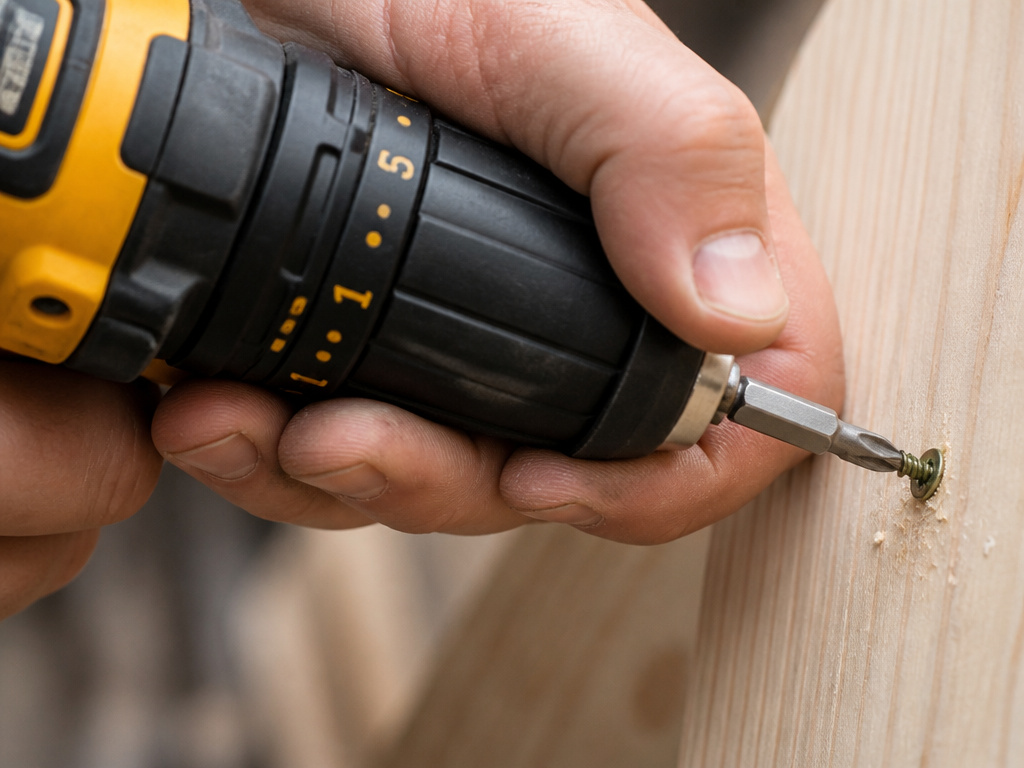
That numbered collar behind the chuck is a torque clutch. It doesn’t control drilling power. It controls how much rotational force the drill applies before it disengages with a rapid click-click-click sound. This is for driving screws, not drilling holes. Turn the collar to the drill/drill bit icon when you want full, unlimited torque for drilling. For screws, start low.
Here’s the field method. Set the clutch to its lowest number. Drive your first screw until it seats flush. If the clutch disengages before the screw is fully seated, move the setting up by one number and try the next screw. Repeat until the screw drives home and the clutch clicks just after. That’s your setting for that screw type and material. Using the highest setting from the start is how you strip Phillips heads and snap screw heads off inside the wood.
Common mistake: Using the drill’s “driver” setting without a clutch for deck screws. The motor delivers all its torque instantly, which overdrives the screw, countersinks it too deep, and weakens the joint. The clutch exists to prevent that.
If your drill lacks a clutch, you must use your trigger finger as the clutch. Start slow, increase speed as the screw engages, and release the trigger the moment the screw head touches the material. This takes practice. You’ll strip a few. This is why a dedicated drill as a screwdriver guide recommends a model with a clutch for finish work.
Hammer Mode vs. Drill Mode: When to Flip the Switch
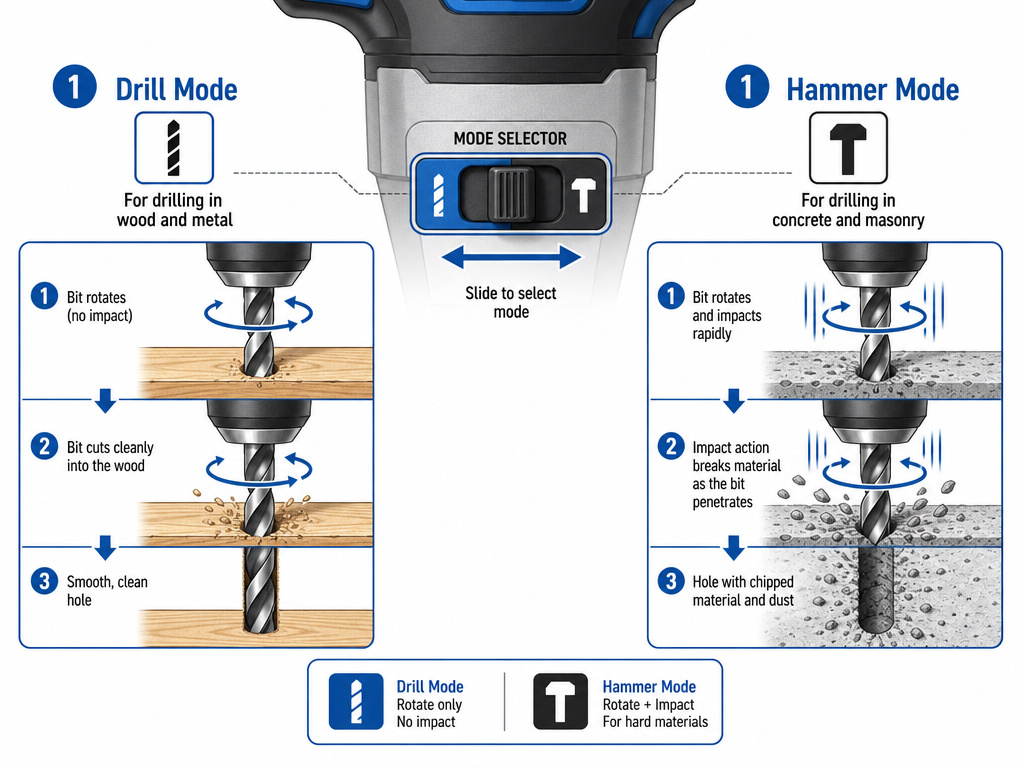
The hammer mode switch is usually a sliding or rotating collar near the drill head with a hammer icon. In drill mode, the chuck only rotates. In hammer mode, the chuck rotates and pulses forward thousands of times per minute (a Benchmark hammer drill hits 0–51,300 BPM). This pounding action is what cracks concrete and brick.
Use hammer mode only on masonry, stone, or thick tile. Never use it on wood, metal, or plastic. The hammer action will shatter a wood screw, destroy a metal drill bit, and turn a plastic wall plug into dust. Conversely, trying to drill into concrete with just the drill mode will dull a carbide bit in seconds and overheat the motor.
How do you know if you need a hammer drill? If your project involves anchoring into a concrete foundation, brick walls, or cinder block, you need the hammer function. For everything else, a standard cordless drill is sufficient. For heavy, all-day masonry work, a dedicated hammer drill is the right tool.
Maintenance: What “Performance Decreases Over Time” Actually Means
The Harbor Freight manual includes this phrase. It refers to three specific wear points: the chuck, the motor brushes, and the bearing assembly.
The chuck jaws wear with every bit change. After 50-100 insertions, they may not grip a bit as tightly, leading to wobble. You can sometimes retighten a loose keyed chuck with the key, but a worn keyless chuck usually needs replacement. The motor brushes are small carbon blocks that transfer electricity to the armature. They wear down over hundreds of hours of use. When they get too short, the drill loses power, sparks visibly inside the vents, and eventually stops working. Most drills allow user replacement of brushes.
The bearing assembly supports the motor shaft. Grit and dust accelerate wear. A high-pitched whine or grinding noise under load signals bearing wear. This is often a professional repair. Cleaning air vents after each use with compressed air significantly extends bearing life.
| Symptom | Likely Cause | Fix | Timeline If Ignored |
|---|---|---|---|
| Bit wobbles in chuck | Worn chuck jaws | Replace chuck | Next use could throw the bit |
| Loss of power, sparking from vents | Worn motor brushes | Replace brush set | Motor fails within 1-2 hours |
| High-pitched whine/grind | Worn motor bearing | Professional service | Bearing seizes, stalls motor |
| Overheating quickly | Clogged air vents | Clean with compressed air | Insulation melts, short circuit |
TL;DR: Clean the vents, listen for new sounds, and expect to replace brushes every few years of active use.
Choosing Your Drill & Bits: A Reality Check
You need one drill that can drill holes and drive screws. For 90% of homeowners, that’s a cordless drill/driver with a keyless chuck, two speed settings, and a adjustable clutch. Brands like DEWALT, Makita, and Ryobi dominate this space. A cordless drill offers the best balance of power and convenience.
For bits, start with a basic set of twist bits for wood and metal, a set of spade bits for larger holes in wood, and a masonry bit set if you have concrete. Choosing a drill bit is about matching the bit’s material (high-speed steel, cobalt, carbide) to the workpiece. Using a wood bit on metal will dull it immediately. Using a masonry bit without hammer mode is useless.
If your work is precision-focused, like metalworking or cabinetry, a drill press provides perfect vertical alignment and consistent depth. For ultimate portability and quiet operation, a hand drill still has its place. And when you’re driving long lag bolts or screws into dense wood, know the impact driver vs drill distinction, the impact driver’s concussive force prevents wrist strain.
Frequently Asked Questions
What is the most common mistake beginners make when using a drill?
The most common mistake is not securing the workpiece. Holding a piece of wood with your hand while drilling seems faster, but when the bit breaks through, the torque can spin the entire piece, slamming it into your fingers or throwing it across the room. Always use clamps or a vise.
Can I use my drill to mix paint or mortar?
Yes, with a dedicated mixing paddle attachment. Do not use a drill bit. The paddle is designed for the viscous load. Use a low gear setting and slow trigger squeeze to avoid splattering. Prolonged mixing can overheat a small drill, so give it breaks.
Why does my drill bit keep getting stuck?
The bit is stuck because you’re not clearing chips. In deep holes, especially in wood or metal, the flutes pack with material and create too much friction. Drill an inch, pull the bit completely out to clear the chips, then drill another inch. This also lets the bit cool.
How do I drill a straight hole without a guide?
Brace your wrists against your body or a stable surface. Sight down the drill from behind, aligning the bit with a vertical or horizontal reference line on the wall. Start the dimple perfectly. A slight angle magnifies over the length of the bit, so correct it in the first quarter-inch.
What does the number setting on my drill mean?
On most drills, the numbers (1, 2, etc.) refer to speed settings, not torque. Setting 1 is low speed/high torque for driving large screws. Setting 2 is high speed for drilling. Some models have a separate numbered collar for the torque clutch, as discussed earlier. Check your manual.
My drill smells like burning. What should I do?
Unplug it immediately. The burning smell is the insulation on the motor windings overheating. Let the drill cool completely. The cause is usually forcing the drill (too much pressure on a dull bit) or a blocked air vent. After cooling, inspect the vents for dust and test on an easy task. If the smell returns quickly, the motor is damaged.
The Bottom Line
Using a drill isn’t about strength. It’s about letting the machine do the work while you manage the variables: safety, speed, bit selection, and pressure. The manual’s dry warnings about ANSI Z87.1 goggles and chuck maintenance are the boring foundation everything else rests on. Skip them, and the project ends with a trip to urgent care or the hardware store for a new tool.
Your first dozen holes might be ragged. The clutch will click too soon on a few screws. That’s the process. The goal is to end the day with all your fingers, a stack of completed work, and a drill that’s still in one piece because you read the specs and followed the steps. Now go clamp something down and make a hole.
