
How to Use a Hammer Drill: Match Settings to Your Material
This post contains affiliate links. As an Amazon Associate, we earn from qualifying purchases.
Using a hammer drill requires matching three things before you pull the trigger: the action mode (drill, hammer, or drive), the correct bit for your material, and a firm two-handed grip with the auxiliary handle. Mismatch any one, and you risk a broken bit, a stalled motor, or a tool that kicks back hard enough to break a wrist.
That match isn’t just a suggestion, it’s the direct translation of the force ratings printed in every operator’s manual. A Makita HP2032 delivers 32,000 blows per minute, but only into concrete rated for its 20mm capacity. Try that hammer action on ceramic tile, and the impact energy shatters the workpiece. The manual says it outright.
What follows is the manual’s warnings turned into a working method. We’ll cover the three critical settings, the step-by-step sequence that actually works, and the specific mistakes that burn out motors or send bits skating across steel.
Key Takeaways
- The mode selector is your primary control. Hammer mode is for masonry only; using it on metal, wood, or tile destroys bits and workpieces.
- Bits are not universal. A standard twist bit will snap in concrete; a masonry bit will glaze over and burn in metal. Match the bit substrate to the material.
- Let the tool do the work. Excessive pressure is the #1 cause of motor burnout and bit failure. The rated impact force (e.g., 3 Joules) does not increase with more shoulder weight.
- The auxiliary handle is non-negotiable for hammer drilling. The sudden twisting force at hole break-through can wrench the tool from one hand.
- Always stop completely before switching rotation direction. Changing from forward to reverse while the chuck is spinning strips the gear teeth, a repair that often costs more than the drill.
The Three Settings That Decide Everything
A hammer drill gives you three controls that a standard drill doesn’t: the action mode selector, a torque clutch, and a forward/reverse switch. Their job is to channel the tool’s force, whether it’s 550 in-lb of torque like the Ryobi P21410 or 33,000 blows per minute like the Makita M8103, into the workpiece without channeling it into the drill’s own gears.
Technical Overview: A hammer drill combines rotational force with a percussive, hammering action generated by two ribbed metal discs (a hammer and an anvil) sliding against each other. This impact mechanism is engaged only when the mode selector is set to the hammer icon. In drill-only mode, the discs disengage, providing standard rotation for wood, metal, or plastic.
1. Action Mode Selector: Drill, Hammer, or Drive
This collar, usually near the chuck, has three symbols: a drill bit (drill mode), a hammer (hammer mode), and a screw (drive mode). Your choice here dictates what the tool will try to do.
- Drill Mode (Drill Bit Icon): Use this for all non-masonry materials. This includes wood, metal, plastic, ceramic tile, and laminate. It provides pure rotation. Engaging hammer mode here is a critical error, the impacts will crack tile, splinter wood, and dull metal bits instantly.
- Hammer Mode (Hammer Icon): Reserve this for concrete, brick, stone, and masonry block. This engages the impact mechanism. The hammer drill mechanism uses two textured plates to convert rotational energy into thousands of tiny forward blows each minute, pulverizing the brittle masonry.
- Drive Mode (Screw Icon): This disengages the hammer action and activates the torque clutch. It’s for driving screws and prevents you from over-tightening and stripping heads or sinking screws too deep.
The part nobody mentions: The switch between these modes is mechanical. Forcing the selector while the drill is running, even at low speed, can grind the internal lugs. Always make this change with the tool completely stopped.
2. Torque Clutch: Your Safety Valve
The numbered collar behind the chuck is your torque clutch. It’s crucial for driving screws and general drilling to prevent gear damage.
- Lower numbers (1-5): Lower torque. Use for driving small screws into softwood or drywall. When the clutch “clicks” and disengages, it stops the drive force, preventing you from stripping the screw head.
- Higher numbers (10-20+): Higher torque. Use for larger screws, lag bolts, or drilling in tougher materials.
- Drill Bit Symbol: This bypasses the clutch entirely, delivering maximum torque directly from the motor. Use this setting only for drilling. Never use the drill setting for driving screws, you will snap the screw, damage the workpiece, or stall the motor.
Common mistake: Leaving the clutch on a high setting for small tasks. You’ll bury a #8 screw through 1/2″ drywall and into the stud behind it before the clutch has a chance to click. Start low and increase only if the clutch disenganges before the screw is seated.
3. Forward/Reverse & Speed Trigger
These controls are familiar but have specific rules on a hammer drill.
- Forward/Reverse Selector: This locks the trigger in the center position. Always lock it before changing bits or storing the tool. The hard rule from the manuals: always allow the chuck to come to a complete stop before changing direction. Switching from forward to reverse while spinning strips the planetary gears.
- Variable Speed Trigger: Start slow. For drilling, a slower speed gives you more control and prevents the bit from “walking” away from your mark. For hammer drilling into concrete, start at a moderate speed to establish the hole, then increase.
| Material | Recommended Mode | Bit Type | Key Technique |
|---|---|---|---|
| Concrete/Brick | Hammer | Carbide-tipped masonry bit | Steady, moderate pressure. Let the hammer action do the cutting. |
| Wood | Drill | Brad-point or twist bit | Higher speed, light pressure. Use a pilot hole for large diameters. |
| Metal | Drill | HSS or cobalt twist bit | Slow speed, firm pressure. Use cutting oil to prevent overheating. |
| Ceramic Tile | Drill | Diamond-tipped or carbide spear-point bit | Start at a 45-degree angle to score, then drill straight. No hammer. |
| Driving Screws | Drive (Clutch Active) | Appropriate driver bit | Set clutch low, increase until screw seats flush. |
What You Need Before You Start
Gathering the right gear prevents mid-job frustration and mistakes. This isn’t just about having a drill.
- The Right Drill Bit: This is the most critical accessory. For masonry, you need a carbide-tipped masonry drill bit. Using a standard bit will dull it in seconds and overheat the drill. Our guide on choosing a drill bit breaks down substrate choices.
- Auxiliary Handle: This isn’t optional for hammer drilling. It provides the counter-torque needed to control the tool during break-through.
- Safety Glasses (ANSI Z87.1): Masonry dust and metal shavings are ejected directly toward your face. Standard glasses aren’t enough; you need side shields.
- Hearing Protection: A hammer drill operates at 85-100 dB. Prolonged exposure without protection causes permanent hearing damage.
- Dust Mask: Concrete dust contains silica, a known carcinogen. A basic N95 mask is essential for indoor or enclosed work.
- Measuring Tape, Pencil, & Level: For marking your hole locations accurately.
- Vacuum or Blow-Out Bulb: For cleaning dust from the hole between drilling passes, which is crucial for depth accuracy and bit cooling.
Before you start: Secure your workpiece. Clamp wood or metal to a bench. For wall drilling, ensure you’ve located studs and avoided wiring/pipes. Always hold the tool with both hands, the main handle and the auxiliary handle, when the hammer function is engaged.
Step-by-Step: From Mark to Hole
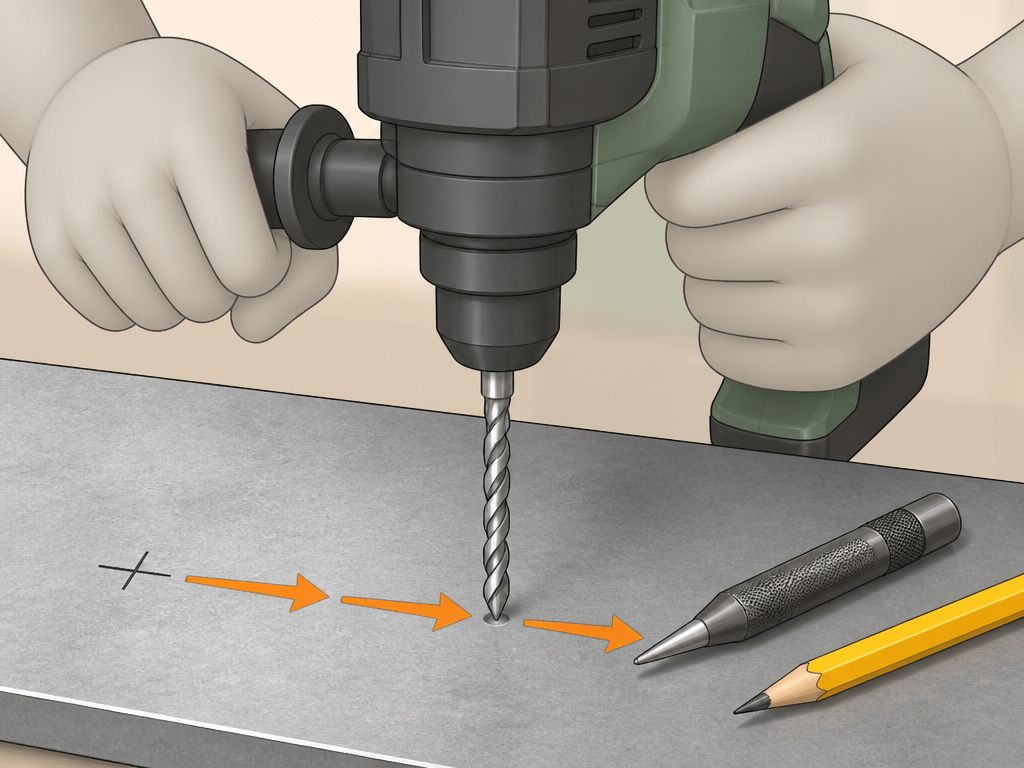 Follow this sequence. Skipping steps leads to crooked holes, broken bits, or a drill bouncing off a hardened surface.
Step 1: Mark and Punch (For Metal & Masonry)
Mark your hole location with a pencil. For metal, use a center punch and hammer to create a small divot. This prevents the bit from “walking.” For concrete or brick, use a masonry nail to chip a small starter mark. For wood, a simple pencil mark is usually sufficient.
Step 2: Insert and Tighten the Bit
Lock the forward/reverse selector in the center position. Open the chuck jaws wider than the bit shank, insert the bit fully, and tighten the chuck by hand. For keyless chucks, ensure you hear three distinct clicks. Never use a wrench on a keyless chuck.
Step 3: Set the Drill
Configure the three settings in this order: 1. Mode Selector: Choose Drill, Hammer, or Drive based on your material (see table above). 2. Torque Clutch: If drilling, turn the collar to the drill bit symbol. If driving screws, start with a low number. 3. Direction: Set the forward/reverse switch to forward.
Step 4: Apply Steady Pressure and Drill
Place the tip of the bit on your mark. Hold the drill firmly with two hands, ensuring it is perpendicular to your workpiece (unless you’re drilling at a deliberate angle). Squeeze the trigger to a low speed to start the hole. Once the bit is engaged, you can increase speed.
- For Masonry: Apply moderate, steady pressure. The tool’s weight plus firm pressure is often enough. You’ll feel and hear the hammering action. If progress stops, you’ve hit rebar or aggregate. Back out, clear the dust with a vacuum or blow-out bulb, and continue.
- For Wood & Metal: Use firm, consistent pressure. Let the bit’s flutes clear the material. In metal, periodically back out to clear chips and add more cutting oil.
Step 5: Clearing Dust and Final Break-Through
As you drill deeper, the flutes can clog. For a clean hole and to prevent overheating, pull the bit out partially while it’s still spinning to eject debris. The most critical moment is break-through on the other side.
Where this goes sideways: At the moment the bit punches through, the resistance vanishes. If you’re leaning into the drill, you’ll lunge forward. This can break the bit, damage the workpiece, or cause injury. Ease up on pressure just as you feel the bit about to exit.
Step 6: Withdraw and Clean
Release the trigger and allow the chuck to stop completely. Remove the bit. Clean the hole and the bit shank of any debris before storing.
What Not to Do: Mistakes That Break Tools
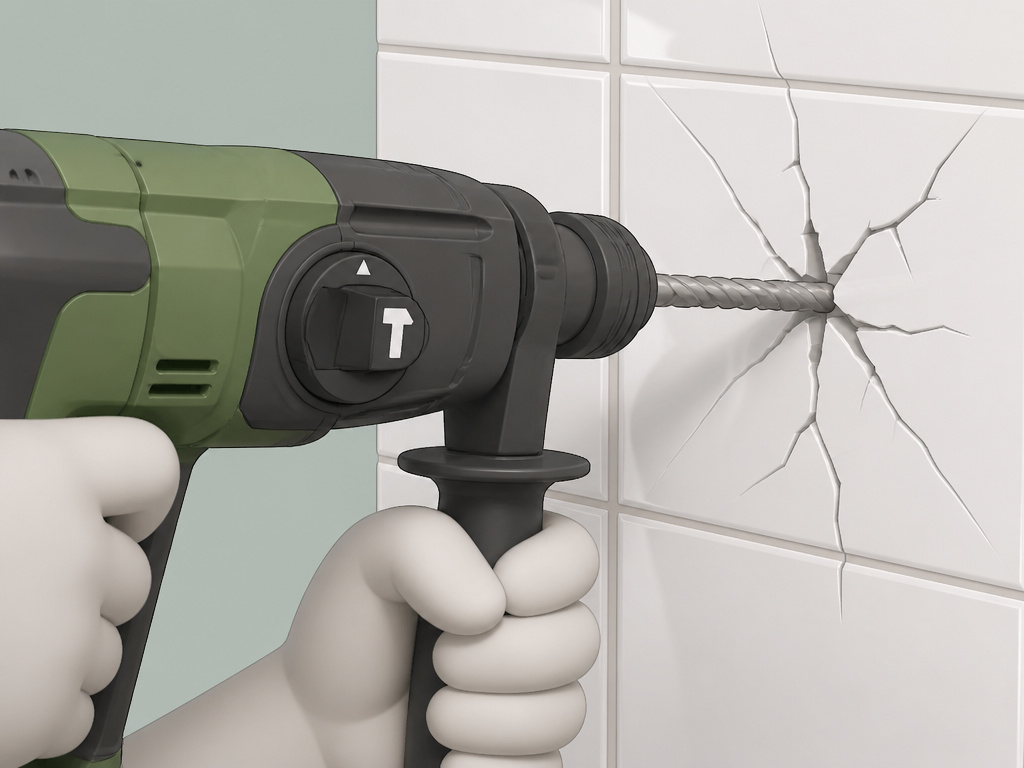 The manuals are explicit about these points because they are the most common, and costly, user errors.
- Never Use Hammer Mode on Non-Masonry. This bears repeating. The hammer drill uses are specific. Hammering on a metal surface work-hardens it, making it impossible to drill. On tile or glass, it causes immediate cracking.
- Don’t Force It. The Ryobi P21410 manual states: “Pressing excessively on the tool will not speed up the drilling. In fact, this excessive pressure will only serve to damage the tip of your bit, decrease the tool performance and shorten the service life of the tool.” If the drill isn’t progressing, your bit is dull, you’re in the wrong mode, or you’ve hit something harder than the bit’s rating.
- Don’t Skip the Auxiliary Handle. The Makita M8103 manual warns of “tremendous and sudden twisting force” at break-through. One hand cannot safely counteract it.
- Never Change Direction While Spinning. This is the fastest way to require a professional gearbox repair. Stop, then switch.
Hammer Drill vs. Other Tools: When to Use What
A hammer drill is a specialist. Understanding its limits prevents you from using it for jobs where another tool is safer and more effective.
| Scenario | Best Tool | Why a Hammer Drill is Wrong |
|---|---|---|
| Driving dozens of deck screws | Impact Driver | A hammer drill’s drive mode is slower, heavier, and less controlled than an impact driver’s direct hammering action. |
| Drilling large holes (over 1/2″) in concrete | Rotary Hammer | A hammer drill’s impact energy is limited. A rotary hammer vs hammer drill comparison shows rotary hammers use a piston mechanism for far greater force, making large holes feasible. |
| Drilling in wood or metal only | Standard Drill/Driver | A standard drill is lighter, cheaper, and perfectly capable. The hammer drill vs drill distinction matters for your wallet and your toolbag weight. |
| Tightening lug nuts or bolts | Impact Wrench | A hammer drill lacks the torque and socket drive system. You’ll damage the drill and the fastener. |
For most DIYers, the hammer drill and impact driver are the core duo of a cordless kit. The drill handles drilling and light driving; the impact driver handles all the heavy screw and bolt work.
Frequently Asked Questions
Can you use a hammer drill as a regular drill?
Yes, absolutely. Set the mode selector to the drill bit icon. This disengages the hammering mechanism, turning it into a standard rotary drill. This is the correct way to drill wood, metal, or plastic. For a refresher on basic drill operation, the fundamentals are the same.
Why is my hammer drill not hammering?
First, check the mode selector. It must be set to the hammer icon. Second, the hammering mechanism only activates under load, when the bit is pressed against a hard surface like concrete. If you pull the trigger in the air, you’ll only hear the motor. Third, if it’s an older drill, the internal hammer mechanism may be worn or jammed with dust, requiring service.
What is the difference between a hammer drill and an impact driver?
They are fundamentally different tools. A hammer drill hammers forward to pulverize masonry for drilling. An impact driver hammers rotationally (in a circle) to deliver extremely high torque for driving screws and bolts. They are not interchangeable. Using a hammer drill to drive screws is inefficient, and using an impact driver to drill into concrete is impossible.
Can I drill into concrete without a hammer drill?
You can, but you shouldn’t. A standard drill will eventually grind through soft brick or mortar with a masonry bit, but it will be extremely slow, will overheat and dull the bit rapidly, and poses a high risk of stalling and damaging the drill’s motor. For any meaningful concrete work, the process for drilling concrete with a hammer drill is the only reliable method.
How do I prevent my drill bit from getting stuck in concrete?
The bit usually sticks when the flutes are packed with concrete dust. The solution is to use a “pecking” motion: drill for 10-15 seconds, then pull the bit out partially while it’s still spinning to clear the dust. Repeat. Using a blow-out bulb or vacuum to clean the hole between passes is even more effective.
Before You Go
Using a hammer drill isn’t about brute force. It’s about letting a specialized tool do its job. Match the hammer mode to masonry, the drill mode to everything else, and the drive mode to screws. Respect the torque clutch and always stop before reversing. Clamp your work, wear your glasses and mask, and use two hands. That’s the sequence that gets clean holes, preserves your bits, and keeps your drill running for years. If you only remember one thing, let it be this: the hammer setting is for concrete and brick, period. Everything else gets the drill.
