
How to Use Your Power Drill as a Screwdriver Correctly
This post contains affiliate links. As an Amazon Associate, we earn from qualifying purchases.
To use a drill as a screwdriver, you need three things: a variable speed trigger, an adjustable clutch, and the correct screwdriver bit. Set the drill to its lowest speed gear, adjust the clutch to a low setting (1-5 for small screws), and start slowly. Increase speed as the screw bites, then slow to a stop to seat it snugly. Drilling a pilot hole and a separate clearance hole is non-negotiable for hardwoods or to prevent splitting.
That last bit about two different holes is where most weekend projects go wrong. You can have the perfect clutch setting and still split a board because the screw head has nowhere to go.
What follows is the mechanical breakdown most guides skip: why the clutch clicks, what that click actually means for the screw head, and the one OEM manual that puts a hard torque limit on using your drill like a hand screwdriver. We’ll walk through settings, bits, and the fastening sequence that keeps your work clean.
Key Takeaways
- The adjustable clutch is your anti-strip insurance. Set it low (1-5) for small screws and test on scrap first.
- Speed kills screws. Always start in the lowest gear (often marked ‘1’ or ‘I’) and use the variable speed trigger to ramp up, then slow to seat.
- Pilot and clearance holes are not the same thing. The pilot hole guides the screw thread; the clearance hole lets the screw shank pass through so the head can pull wood tight.
- A Makita DF010D manual specifies a 5 Nm (3.7 ft-lbs) limit when using the tool as a hand screwdriver. Exceeding that can damage the gear train.
- Phillips bits cam out. Use a Pozidriv bit for Phillips screws, or switch to Torx or square-drive screws for no-slip driving.
What Setting Should Your Drill Be On to Drive Screws?
A variable speed drill will double as a power screwdriver by using a screwdriver bit. The technique is to start slowly, increasing speed as the screw runs down. Set the screw snugly by slowing to a stop. Prior to driving screws, pilot and clearance holes should be drilled. . Skil and Bosch power tool operating manuals
Your drill has two or three controls that matter for screw driving. Get these wrong, and you’ll strip the head, split the wood, or stall the motor.
First, find the gear selector. It’s usually a sliding switch near the trigger with a ‘1’ and a ‘2’. For screw driving, you want gear ‘1’ every time. This is your low-speed, high-torque setting. The IKEA FIXA cordless drill, for example, runs 0–350 RPM in Position I and 0–1200 RPM in Position II. Gear two is for drilling holes fast. Gear one is for control.
Second, locate the torque selector collar, the ring of numbers around the chuck. This is your adjustable clutch. Those numbers (1 through 10, 15, or 24) don’t represent foot-pounds. They’re a relative scale. Lower numbers mean the clutch will disengage, making a rapid clicking sound, at lower torque. Start at setting 3 for a #8 wood screw into pine. If the clutch clicks before the screw head is flush, move to 4 or 5.
Common mistake: Leaving the clutch on the drill bit icon. That bypasses the clutch entirely, sending full motor torque into the screw. You’ll strip the head or sink the screw too deep in half a second.
Why does the clutch click? Inside the tool, a spring-loaded set of plates press together. When the torque at the bit exceeds the spring pressure you’ve set with the collar, the plates slip past each other. That clicking is the plates slipping and re-engaging, halting rotation and protecting the screw head from over-torque. A Milwaukee manual states the clutch, “when properly adjusted, will slip at a preset torque to prevent driving the screw too deep and to prevent damage to the screw or tool.”
Third, the variable speed trigger. Squeeze gently to start. As the screw threads in, you can squeeze harder for more RPM. When the screw head is nearly seated, ease off the trigger and let the screw’s final turns happen slowly. This prevents the bit from jumping out of the head and marring your workpiece.
The 3-Hole System Every Manual Assumes You Know
You can have the settings perfect and still ruin a project by driving a screw into solid wood. Wood splits when fibers are forced apart. A pilot hole relieves that pressure by removing material for the screw’s core. But that’s only the first hole.
The Skil and Bosch manuals detail a three-step process they call “fastening with screws.” It’s not a suggestion.
- Clamp the pieces together. Drill a pilot hole through both pieces. This hole should be roughly two-thirds the diameter of the screw’s core (the solid shaft minus the threads). For a softwood like pine, drill two-thirds of the screw’s length. For oak or maple, drill the full length.
- Unclamp the pieces. In the top piece only, drill a second hole, the clearance hole. This hole must match the diameter of the screw’s shank (the unthreaded portion just under the head).
- Countersink for flat-head screws. If you’re using a flat-head or countersunk screw, drill a third, conical hole in the top piece so the screw head sits flush or below the surface.
The clearance hole is the part everyone misses. Without it, the screw threads bite into the top piece, preventing the head from pulling the two boards tightly together. The screw just spins, or it splits the wood as it tries to pull. The clearance hole lets the shank pass through freely so the head can cinch everything down.
TL;DR: Pilot hole in both pieces for the threads. Clearance hole in the top piece only for the shank. They are different sizes for a reason.
Screwdriver Bits: Why Phillips is the Worst Choice
The bit is the only thing transferring torque from your drill to the screw. A worn or mismatched bit is a guarantee of frustration.
Phillips-head screws (the ones with a simple cross) are designed to cam out, the bit is meant to slip when a certain torque is reached. This was a feature for assembly lines to prevent over-tightening. For a DIYer, it’s a bug. It strips the head and rounds out the socket. If you must drive Phillips screws, use a Pozidriv bit. It has additional ribs between the cross and won’t cam out as easily.
For everything else, Torx (star) or square-drive (Robertson) screws are superior. The bit engages more surface area, transfers torque efficiently, and almost never slips. The bit is also less likely to walk out of the head as you drive.
| Drive Type | Best For | Biggest Risk |
|---|---|---|
| Phillips | Existing hardware, light duty | Cam-out strips the head quickly |
| Pozidriv | Phillips screws you can’t replace | Misidentified as Phillips; wrong bit strips it |
| Torx (Star) | New projects, high torque | Requires matching driver; not as universal |
| Square (Robertson) | Woodworking, decking | Can be hard to find in some regions |
Insert the bit fully into the chuck. For a quick-release chuck, push the sleeve forward, insert the bit until it clicks, and release. For a keyless chuck, turn the sleeve counter-clockwise to open the jaws, insert the bit, and turn clockwise to tighten until it ratchets. A Milwaukee manual specifies to “insert the bit far enough for the chuck jaws to grip the hex of the bit.” If you only grip the flutes, the bit will wobble and slip.
When Your Drill Is a Screwdriver (And When It Isn’t)
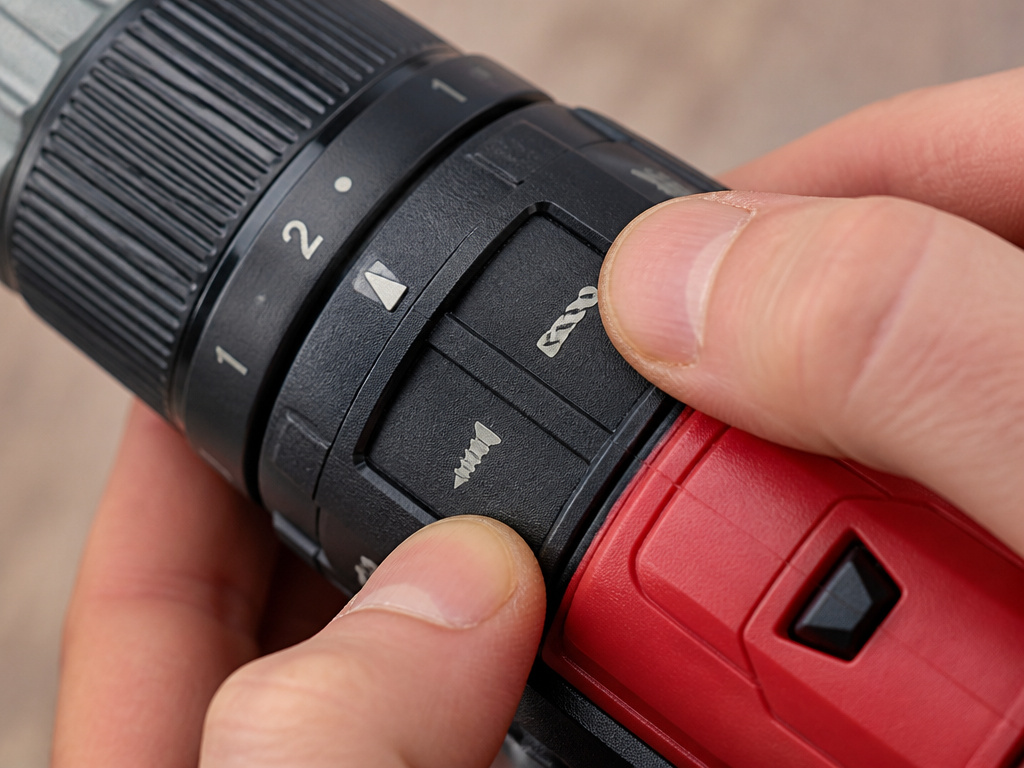
Some drills have a dedicated screwdriver mode, often marked with a screw icon on the application selector. This mode typically locks the tool into its lowest speed and enables the clutch. The Milwaukee 2606-20 operator’s manual is clear: rotate the selector to the drive symbol, then set the torque collar. This is the ideal setup.
But what about using the drill like a hand screwdriver, turning the chuck by hand? The Makita DF010D instruction manual has a specific warning for this: “use the tool with a fastening torque less than 5 Nm (3.7 ft•lbs)” when the motor is off and the lock button is engaged. Why? The planetary gear train inside isn’t designed for high manual torque. Exceed that 5 Nm limit and you risk cracking a gear tooth.
Most modern cordless drills like a DeWalt DCD791 or a Ryobi PBLDD01B are built for this dual use. Their brushless motors and gearboxes handle the load. The older, bulkier corded drill you pulled from your dad’s garage? Probably not. If it’s heavy, loud, and only has a two-finger trigger, reserve it for drilling.
Where this goes sideways: Using an impact driver as a screwdriver. An impact driver delivers rotational hammer blows for extreme torque, meant for lag bolts and framing. It will destroy a #8 wood screw and the bit trying to drive it. The difference between impact driver and drill is one of the most important distinctions in your tool bag.
Step-by-Step: Driving a Screw Without Stripping It
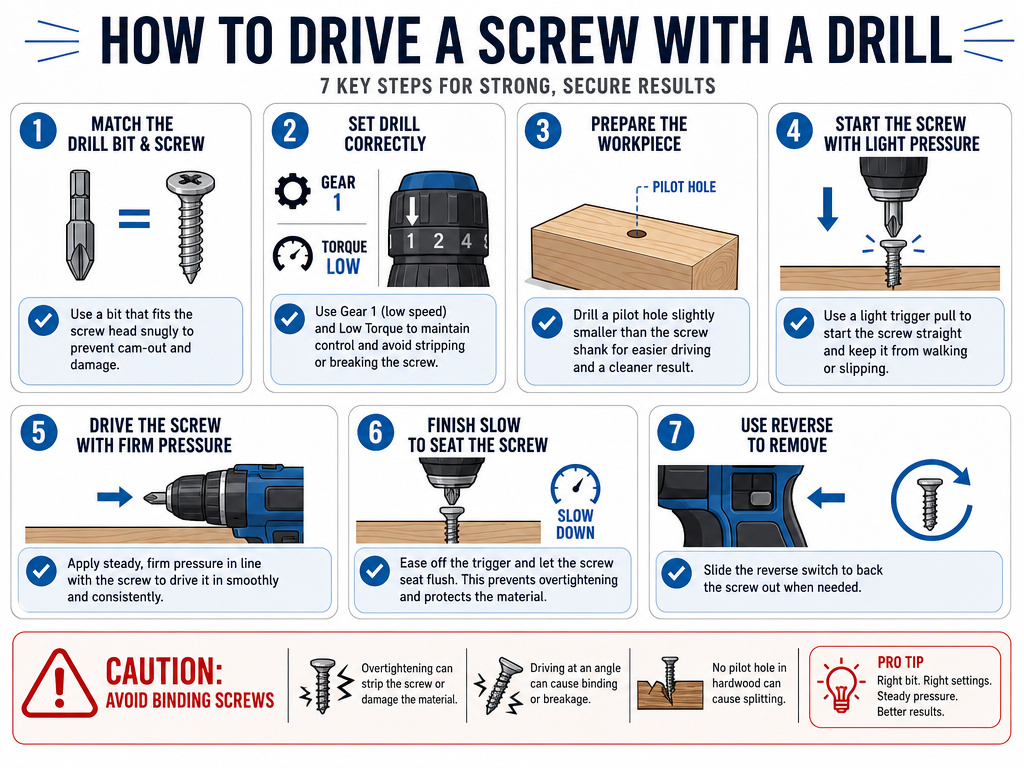
Here is the sequence, from bit selection to final snug turn.
- Select the bit. Match it exactly to the screw head. A #2 Phillips for a #2 Phillips screw. A T25 for a T25 Torx screw. No substitutions.
- Set the drill. Gear selector to ‘1’. Torque collar to a low setting (3-5). Direction switch to forward.
- Prepare the workpiece. Drill your pilot hole and clearance hole. For a flat-head screw, countersink.
- Start the screw. Place the screw on the bit, hold it in the hole, and pull the trigger just enough to get the screw started. Let the bit’s magnet do the work.
- Drive with increasing pressure. As the screw threads in, apply firm, straight-line pressure and gradually increase speed with the trigger.
- Finish slow. When the screw head is about to contact the wood, ease off the trigger. Use the last bit of momentum to seat the screw snugly. Listen for the clutch to click if you set it correctly.
- Reverse to remove. Flip the direction switch to reverse. The same clutch setting controls removal torque, which can prevent damaging the head if the screw is stuck.
If the screw stops turning but isn’t seated, don’t just crank the clutch to a higher number. Stop. The screw is likely binding. Back it out, check for a knot in the wood, and widen the pilot hole slightly.
Troubleshooting: Why Isn’t This Working?
Your screw isn’t going in, or it’s going in wrong. Here’s the fix.
| Problem | Likely Cause | Immediate Fix |
|---|---|---|
| Screw spins but won’t pull tight | No clearance hole in top piece | Back out, drill correct clearance hole |
| Drill stalls, motor hums | Clutch set too high, or pilot hole too small | Lower clutch setting, check/redrill pilot hole |
| Screw head strips instantly | Wrong bit, worn bit, or using impact driver | Use new, correct bit; switch to drill mode |
| Clutch clicks immediately | Torque setting too low for screw size/material | Increase clutch setting one click at a time |
| Screw drifts sideways at start | Not starting straight, or no starter dimple | Apply more downward pressure at start; use a center punch |
A cordless drill with a weak battery will also bog down. A 1.3 Ah battery like the one in the IKEA FIXA is fine for a dozen screws. For a deck, you need a 4.0 Ah or 5.0 Ah pack. The voltage matters less than the amp-hour rating for sustained torque.
If you’re driving many screws, the bit will get hot. A hot bit softens and deforms, losing its grip. Keep a second bit on hand to swap out. Let the hot one cool before using it again.
Frequently Asked Questions
Can any drill be used as a screwdriver?
Any variable speed drill with a clutch can be used as a screwdriver. Basic, single-speed drills without a clutch are for drilling holes only. Using one on screws will likely strip the head or damage the workpiece.
What is the number setting on a drill for screws?
The numbers on the torque collar are a relative scale for the adjustable clutch. Lower numbers (1-5) make the clutch slip at lower torque, ideal for smaller screws and soft materials. Higher numbers (10-15+) are for larger screws or harder materials. The drill bit icon bypasses the clutch for maximum torque, used only for drilling.
Why does my drill keep stripping screw heads?
Three reasons: using a worn or incorrect bit (like a Phillips in a Pozidriv), having the clutch set too high or in drill mode, or not drilling a pilot hole in hard material. The bit cams out of the head, grinding away the socket instead of turning the screw.
Is it better to use a drill or an impact driver for screws?
Use a drill for precision work, smaller screws (#2–#10), and when appearance matters (like cabinetry). Use an impact driver for high-torque applications like driving long lag bolts, deck screws, or into dense lumber. The impact mechanism is brutal on small screw heads.
How do I stop the screw from going in too deep?
Use the adjustable clutch. Start at a low setting and drive a test screw into a scrap piece of your project material. If the screw isn’t flush when the clutch clicks, increase the setting by one number and test again. Repeat until you find the setting that seats the screw perfectly.
The Bottom Line
Using a drill as a screwdriver isn’t just about swapping a bit. It’s about engaging the clutch, respecting the low gear, and, most importantly, preparing the wood. The pilot and clearance hole system isn’t optional for clean work. Skip it, and you fight the material every time.
For most driving tasks, a mid-range cordless drill like a DeWalt 20V or a Milwaukee M18 Fuel set on gear 1 with the clutch at 5 will handle 90% of what a homeowner throws at it. Keep a set of fresh Torx bits in the case, and you’ll never strip a screw head again. The tool knows how to do the job. Your job is to tell it where to stop.
