
Attaching a Hole Saw to a Drill: A Step-by-Step Setup Guide
This post contains affiliate links. As an Amazon Associate, we earn from qualifying purchases.
To attach a hole saw to a drill, you need the correct arbor (mandrel) that matches your hole saw’s thread and your drill’s chuck size. Insert the pilot bit through the hole saw, align any drive pins, and secure it with the arbor nut before tightening the whole assembly into your drill chuck.
That’s the short answer. The long answer is that “correct” means three specific connections lined up. Get one wrong and the saw spins loose inside two cuts, the pilot bit snaps, or the whole thing jams and strips the threads on your brand-new arbor.
What follows is the breakdown of those three connections, arbor to chuck, arbor to saw, pilot to work, plus the assembly steps for the four most common hole saw systems you’ll find. By the end, you’ll know which setup you have and how to lock it down tight.
Key Takeaways
- The arbor’s shaft diameter (commonly 1/4″, 11/32″, or 7/16″) must match your drill’s chuck capacity. A 1/2″ chuck can take any, but a 3/8″ chuck limits you.
- The pilot bit must extend 3/16″ to 1/4″ beyond the hole saw’s teeth. Less than that and it won’t center the cut; more and it binds and breaks.
- If your arbor has drive pins and your hole saw has matching holes, you must engage them. Skipping this lets the saw spin independently on the threads, which strips them within a few uses.
- For a standard 3-piece arbor, hand-tighten the retaining nut. Cranking it with a wrench can fuse the nut to the threads, making disassembly a nightmare.
- Always verify the assembly is secure by trying to twist the hole saw against the arbor collar by hand before powering up the drill.
The 3 Critical Connections for a Secure Fit
A hole saw assembly is a chain. The drill chuck holds the arbor shaft, the arbor holds the saw, and the pilot bit guides the cut. A weak link breaks the chain. Your job is to check each link.
The Harbor Freight 57524 manual specifies using the “correct size arbor for selected Hole Saw” and to “Verify drill’s chuck is in good condition and fits securely.” This isn’t generic advice, a mismatch here is the direct cause of wobble, which cracks saw blades and damages drill chucks.
First, the arbor shaft to the drill chuck. This is about diameter. Most arbors have a straight round shaft meant for a keyed or keyless jaw chuck.
| Arbor Shaft Diameter | Fits Drill Chuck Size | Typical Use Case |
|---|---|---|
| 1/4 inch | 1/4″, 3/8″, 1/2″ | Small hole saws (up to 2″) |
| 11/32 inch | 3/8″, 1/2″ | Mid-size saws (2″-4″) |
| 7/16 inch | 1/2″ | Large, heavy-duty saws (4″+) |
The rule is simple: your chuck must be able to close tightly on the shaft. A 1/2″ chuck can grip a 1/4″ shaft, but it’s not ideal, the smaller shaft can slip under high torque. Match them as closely as you can. If your drill has a 3/8″ chuck, you’re shopping for a 1/4″ or 11/32″ arbor.
Second, the arbor to the hole saw. This connection has two parts: threads and drive pins.
The threaded post on the arbor screws into the threaded center hole of the hole saw. That’s the primary attachment. But many arbors also have two small steel pins protruding from the collar. These match holes in the backplate of the hole saw.
Where this goes sideways: Assuming the threads are enough. The drive pins are there to transfer the drill’s rotational force. If you don’t engage them, all that torque goes through the fine threads. They will deform, cross-thread, or strip. You’ll hear a grinding noise on the second or third hole, and then the saw will spin freely while the arbor turns.
The final link is the pilot bit. Its job is to start the hole and keep the saw from walking. The ITM manual gives the exact spec: the bit should extend 3/16” to 1/4” beyond the cutting teeth.
Less than 3/16″ and the teeth hit the material before the bit can establish a center. The saw skates. More than 1/4″ and the long, unsupported section of the bit flexes under side pressure, snaps, and leaves a broken drill bit embedded in your workpiece. Check this with a ruler before every use.
Step-by-Step Assembly for a Standard 3-Piece Arbor
This is the classic setup: a separate arbor, a hex nut, and a pilot bit. It’s common in kits like the Harbor Freight 57524 and most general-purpose hole saw kits. Follow this sequence.
- Select the arbor and pilot bit. Most kits come with two arbors (large and small mandrels). The correct one will fit snugly into the hole saw’s center, no slop. If your pilot bit is loose in the arbor, tighten the set screw with the provided hex key.
- Thread the arbor through the hole saw. Remove the hex nut. Push the arbor’s pilot bit through the front of the hole saw (the toothed end). The arbor’s collar should seat against the saw’s backplate.
- Engage the drive pins. This is the step people miss. Rotate the hole saw until the pins on the arbor collar drop into the corresponding holes on the saw’s backplate. You’ll feel a slight click or stop. If your saw has a “three-hole” pattern, you may need to use a drive plate between the saw and arbor, as noted in the Harbor Freight manual.
- Hand-tighten the retaining nut. Slide the hex nut onto the threaded end of the arbor behind the saw. Screw it on finger-tight until it seats firmly against the back of the saw. Do not use pliers or a wrench.
- Secure in the drill chuck. Open your drill’s chuck, insert the arbor shaft fully, and tighten. For a keyless chuck, twist until it won’t turn further. For a keyed chuck, use the key in all three holes to ensure even pressure.
Why hand-tighten the nut? Because over-tightening deforms the soft metal threads, especially on cheaper kits. After a few heat cycles from cutting, the nut seizes. You’ll need vise-grips and penetrating oil to get it off, and you’ll likely damage the arbor. Finger-tight is enough to resist the cutting force; the drill’s rotation direction keeps it that way.
One-Piece, Quick-Change, and SDS Systems
Not every hole saw uses a nut and bolt system. You might encounter one of these three.
One-Piece Arbors: The hole saw is permanently screwed onto the arbor. You see this on cheap, task-specific sets, like a hole saw for tile. The downside is obvious: when the saw is dull, you throw the whole thing away. There’s no replacing just the blade. The upside? No assembly mistakes.
Quick-Change or “S-Lock” Systems: These use a bayonet-style mount. You align marks on the arbor and saw, push together, and twist to lock. It’s fast and doesn’t require tools. The Miyanaga S-Lock manual warns to align the markings and then rotate them apart to lock, a reverse of what feels intuitive. These are fantastic for frequent bit changes but cost more. They are common on professional-grade best hole saws for metal.
SDS-Plus Arbors: For rotary hammer drills. The arbor has an SDS shank, not a round one. You’ll need an SDS-plus drill. The attachment is a simple push-and-twist into the drill’s chuck. Never force an SDS arbor into a standard jaw chuck, it won’t hold and is dangerous.
| System Type | Attachment Method | Best For | Critical Check |
|---|---|---|---|
| Standard 3-Piece | Threaded nut | DIYers, general kits | Drive pins engaged, nut hand-tight |
| One-Piece | Pre-assembled | Single-use tasks, beginners | Ensure it’s for the correct material |
| Quick-Change (S-Lock) | Bayonet lock & twist | Pros, frequent material changes | Audible “click” and aligned marks |
| SDS-Plus | SDS hammer drill chuck | Masonry, concrete, heavy-duty | Compatible SDS-plus drill only |
Choosing the right system depends on your project volume. For occasional use, a standard hole saw set is fine. If you’re cutting a lot of stainless steel, invest in a quick-change system and a dedicated hole saw for stainless steel. The time and frustration saved are worth it.
Safety and Operation Checks Before You Drill
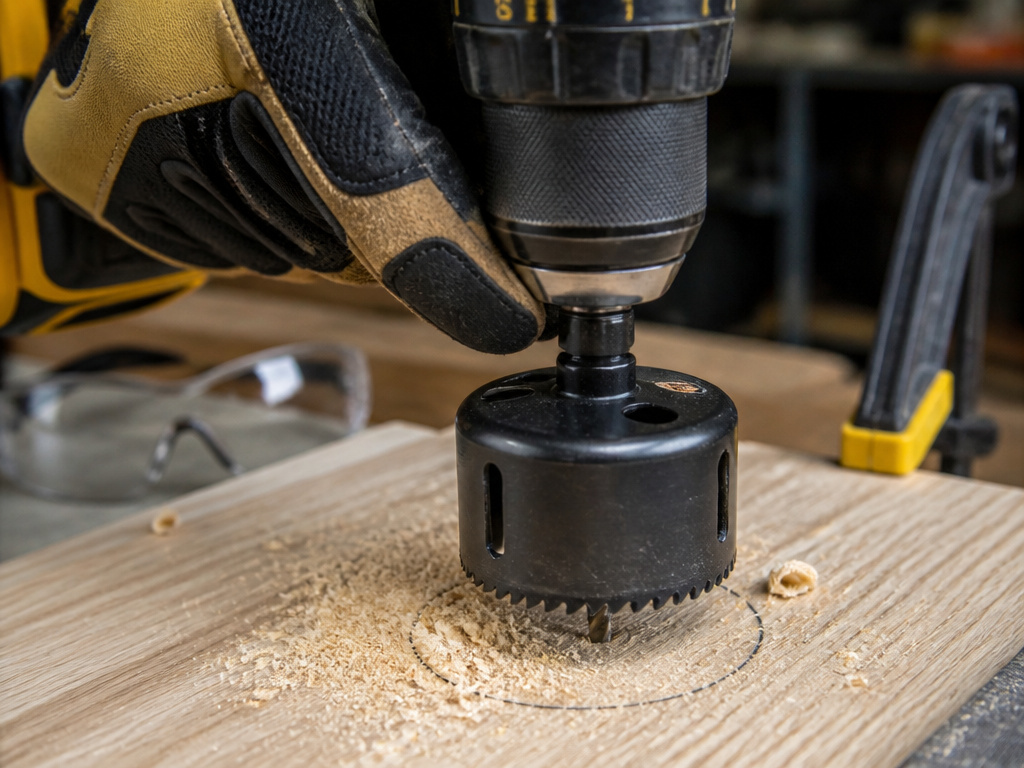
The assembly is just the start. How you use it determines whether you finish the job or visit the emergency room.
Before you start: Wear ANSI-approved safety goggles and heavy-duty work gloves. The saw generates sharp, hot chips that fly. Gloves protect your hands when handling the hot saw after cutting. Also, secure your workpiece with clamps. A hole saw can grab and spin the material violently.
Start with the pilot bit. Its job is to establish the center. Press the spinning saw lightly until the pilot bites and the outer teeth score a full circle. This is the groove phase. Once you have a full groove, you can increase pressure and speed slightly.
Let the tool do the work. Forcing it overheats the teeth, dulls them instantly, and increases the chance of the bit snapping. On larger diameters (over 2″), reduce your pressure. The greater surface area of the teeth creates more friction and heat.
If you’re drilling through metal, especially with a hole saw for metal, use cutting oil. It cools the teeth, lubricates the cut, and extends the blade life by three or four times. A dry cut on steel will blue the teeth in one hole, ruining their temper.
The most critical moment is breakthrough. When the pilot bit punches through the back of the material, reduce pressure immediately. The saw will lurch forward slightly. Continue spinning and gently pull the saw back out while it’s still rotating to clear the slug. Never reverse the drill direction to remove a stuck saw, this breaks teeth.
What if the core gets stuck inside the saw? It happens. Don’t panic and don’t keep drilling. Remove the entire assembly from the drill. Most arbors have a small cross-hole or include a pin you can use to poke the slug out from the back. For a hole saw for wood, a stiff wire often works.
Troubleshooting: When the Attachment Fails
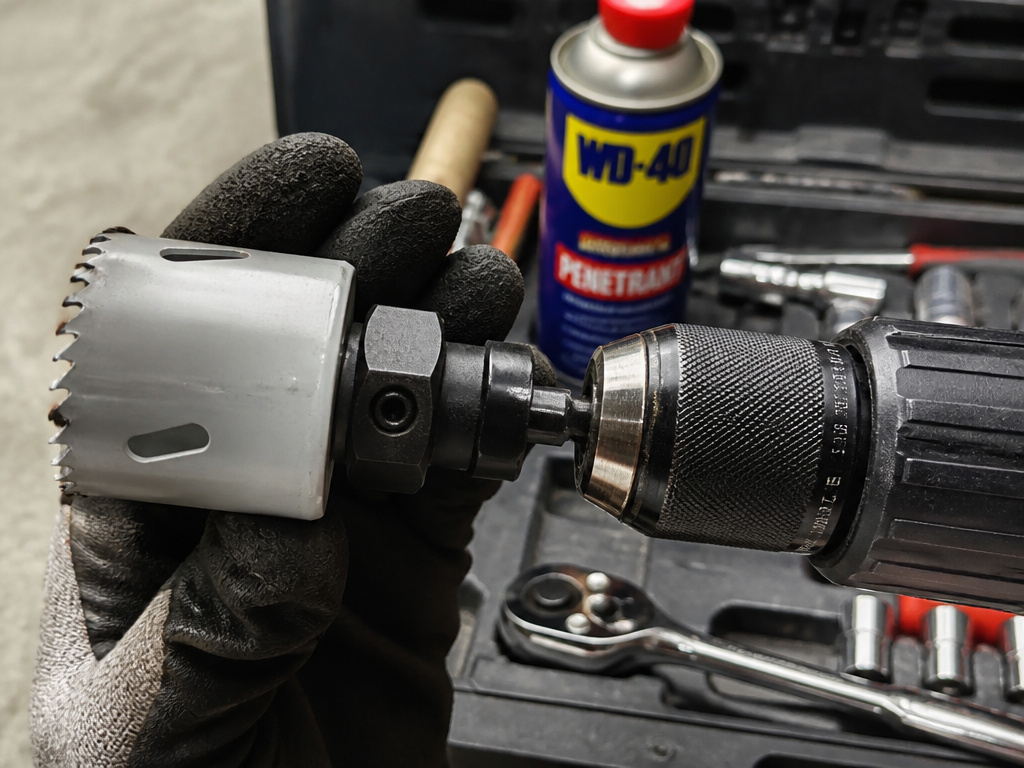
You followed the steps, but something’s wrong. Here’s what to check.
Problem: The hole saw wobbles violently when the drill spins.
Likely Cause: The arbor shaft is not fully seated in the chuck, or the chuck jaws are worn and not gripping evenly.
Fix: Remove the assembly. Clean the arbor shaft and chuck jaws of any debris. Re-insert fully and re-tighten. If wobble continues, try a different drill.
Problem: The hole saw spins on the arbor, but the arbor turns fine.
Likely Cause: Drive pins are not engaged, or the retaining nut is loose.
Fix: Stop immediately. This is stripping the threads. Disassemble, align the pins and holes, and re-tighten the nut. If the threads are already damaged, you need a new arbor.
Problem: The pilot bit snaps off.
Likely Cause: Bit extended too far (>1/4″), excessive side pressure, or using a wood bit on metal.
Fix: Replace the bit, ensuring the new one protrudes only 3/16″-1/4″. Use a center punch to start the hole if the material is hard. Match the bit type to your material, a standard twist bit for wood, a carbide-tipped bit for masonry or metal.
Problem: The retaining nut is seized and won’t come off.
Likely Cause: Over-tightened with tools and heated from use.
Fix: Apply a penetrating oil like Liquid Wrench to the threads. Let it soak for 15 minutes. Use a socket wrench that fits the nut flats, not pliers. If it still won’t budge, you may need to sacrifice the nut by cutting it off with a Dremel, a last resort.
Regular maintenance prevents most of these. After each use, disassemble the saw and arbor. Brush out metal or wood dust from the threads and pin holes. A light spray of WD-40 on the threads prevents corrosion and seizing. Store them in the case, not loose in a toolbox. A clean tool is a tool that works next time.
Frequently Asked Questions
What if my hole saw doesn’t have holes for drive pins?
Some cheaper hole saws rely solely on the threaded connection. This is less secure and not recommended for heavy use or hard materials. When using one, be extra vigilant about hand-tightening the nut securely and avoid high-torque settings on your drill. Consider it a sign to upgrade your hole saw kit.
Can I use an impact driver with a hole saw?
You can, but you shouldn’t. Impact drivers deliver sudden, high-torque rotational blows. This is terrible for the fine teeth of a hole saw and will shatter carbide teeth or snap pilot bits instantly. Use a standard drill with variable speed control. The only exception is a specific quick-change arbor designed for impact drivers, which is rare.
How do I know what size arbor I need?
The size is dictated by your hole saw and your drill. First, check the center hole of your hole saw, its threads must match the arbor’s post. Second, measure the diameter of the arbor’s shaft. It must fit your drill’s chuck (1/4″, 3/8″, or 1/2″). When in doubt, take the old arbor or the hole saw to the hardware store for a direct match.
Why is a pilot hole important for a hole saw?
The pilot hole drilled by the center bit is what guides the entire saw and keeps it from “walking” across the surface. Without a properly centered and sized pilot, the large-diameter saw teeth will skate unpredictably, ruining your workpiece and potentially causing a kickback. It’s the anchor for the entire operation.
My drill chuck won’t tighten on the small arbor shaft. What now?
Your chuck’s minimum grip capacity is larger than the shaft. The fix is a reducing sleeve or a collet adapter, which is a small metal sleeve that fits over a 1/4″ shaft to make it a 3/8″ diameter. You can find these in the drill accessory aisle. It’s a better solution than cranking the chuck jaws down on thin air, which damages them.
Can I attach other tools to my drill with an adapter?
Absolutely. The principle is similar, matching the tool’s connection to a compatible drill adapter. Whether it’s a socket, a buffing pad, or a sanding drum, you need the right shank type and size. The same rule applies: secure the connection fully before applying power.
Before You Go
Attaching a hole saw isn’t a mystery. It’s a checklist: chuck size, arbor shaft, drive pins, pilot bit depth, tight nut. Miss one and the tool fights you. Hit them all and it’s a smooth, controlled cut every time.
Start with a quality hole saw guide to understand cutting technique, and match your blade to the job, wood, metal, or tile. Keep the teeth sharp; a dull hole saw requires more force, which stresses every connection you just carefully made. The right setup is what separates a clean, quick hole from a broken tool and a ruined afternoon.
