
How to Charge a Drill Battery Without a Charger: Safe Methods
This post contains affiliate links. As an Amazon Associate, we earn from qualifying purchases.
You can charge a drill battery without its charger by using a regulated bench power supply set to the correct constant current and constant voltage (CC/CV) profile. This requires knowing the battery’s nominal voltage (e.g., 18V), its maximum charge voltage (typically 20.5V–21V for a 5-cell pack), and setting a safe current limit (0.5A–2A). You must verify these specs with a multimeter first. Using an unregulated laptop charger or forcing connections is how batteries swell, vent, or catch fire.
That voltage and current profile is the only thing standing between a successful charge and a dead battery—or worse. A generic “20V” laptop adapter isn’t a charger; it’s a fixed-voltage source that ignores the battery’s internal management circuit. If the battery can’t negotiate the charge, the board fries.
What follows is the method that actually works, pulled from OEM service manuals and the one mistake that turns a $50 battery into hazardous waste. We’ll cover the three mandatory safety checks, the step-by-step bench supply procedure, and the common shortcuts that destroy cells.
Key Takeaways
- Never charge without a multimeter. You must confirm the battery’s current voltage and identify its positive and negative terminals. Guessing guarantees a short circuit.
- A bench power supply with CC/CV mode is the only safe substitute. Set it to the battery’s maximum charge voltage (usually 20.5V–21V for an 18V pack) and a current limit of 0.5C (e.g., 1A for a 2Ah battery).
- Temperature is a hard limit. Charging below 0°C (32°F) or above 35°C (95°F) permanently damages lithium-ion cells and increases fire risk, per Bosch and Milwaukee manuals.
- Stop immediately if the battery gets hot. A warm battery is normal; a case that’s too hot to touch means internal failure. Disconnect and move it to a non-flammable surface.
- Mismatched laptop chargers usually fail. Their fixed voltage often misses the battery’s required CV peak, leading to undercharging that stresses cells or overvoltage that trips protection circuits.
Before you start: This process involves exposed electrical terminals and lithium-ion batteries, which can vent toxic fumes or ignite if mishandled. Wear safety glasses. Work on a non-flammable, non-conductive surface like a wooden bench. Keep a Class D fire extinguisher or a bucket of sand within reach. If you are unsure about any step, stop. A new charger is cheaper than a hospital visit.
The Three Non-Negotiable Safety Checks (Before You Start)
You need three pieces of information before connecting a single wire. Missing any one voids the entire operation.
First, identify the battery chemistry. Every modern cordless drill uses Lithium-ion (Li-ion). You cannot use charging methods for Nickel-Cadmium (NiCd) or Nickel-Metal Hydride (NiMH) batteries. The label on the battery pack will state “Li-ion.” If it doesn’t, assume it’s Li-ion for any tool made in the last decade.
Second, know the voltage. This is where a digital multimeter is non-negotiable. – Set your multimeter to DC Volts (VDC). – Identify the main positive (+) and negative (-) terminals on the battery. These are usually the largest, most prominent metal contacts. – Touch the red probe to positive, black to negative. A fully charged 18V nominal (20V MAX) battery will read around 20–21V. A depleted one may read as low as 15V. If it reads 0V, the internal protection circuit may have tripped due to deep discharge; proceed with extreme caution or discard the battery.
Third, inspect for physical damage. Look for any cracks in the plastic housing, bulging sides, or signs of leakage. Smell the battery near the vents. A sharp, chemical odor means a cell is leaking. The 20V MAX drill manual states: “If the housing breaks or cracks, discontinue use and do not recharge.”
Where this goes sideways: Charging a physically damaged or wet battery. Corrosion on the terminals creates high resistance, causing the connection point to overheat. The terminal can melt the plastic housing within minutes, exposing live cells.
If your battery passes all three checks, you can proceed. If it fails any, your job is not to charge it. Your job is to fix a battery or recycle it safely.
The Core Principle: Constant Current / Constant Voltage (CC/CV)
Lithium-ion batteries don’t charge like a bucket filling with water. They require a specific two-stage process, and the original charger handles this automatically.
| Charging Stage | What Happens | How a Bench Supply Mimics It |
|---|---|---|
| Constant Current (CC) | The charger supplies a fixed current (e.g., 2A) while the battery voltage rises. | Set the power supply’s current limit (e.g., 1A). The voltage will start low and climb. |
| Constant Voltage (CV) | Once voltage hits the peak (e.g., 21V), the charger holds that voltage. Current then tapers down as the battery saturates. | Set the power supply’s voltage limit to the battery’s max charge voltage. Watch the current drop to near zero. |
| Termination | The charger stops when current drops below a threshold (~3% of the rated current). | Manually disconnect when the current reading on your supply holds steady at a very low level (e.g., 0.1A) for 10 minutes. |
The IKEA TRIXIG battery manual provides a perfect example of this in action. For its 10.8V (12V rated) pack, charge time changes based on input current: < 150 minutes at 3A, < 210 minutes at 2A, < 360 minutes at 1A. A higher current shortens the CC stage but must still transition to CV.
If your power source can’t do CC/CV, it’s not charging the battery. It’s either trickle-feeding it or overpowering it.
Step-by-Step: The Bench Power Supply Method
This is the only method we recommend. It gives you direct control over voltage and current, with visual feedback at every step.
Tools You Must Have:
- A regulated bench power supply with adjustable voltage and current (CC/CV) controls.
- Alligator clip leads or a secure terminal connection.
- Your digital multimeter (for double-checking).
- Personal protective equipment (safety glasses).
The 7-Step Process:
-
Determine your settings. For a common 18V nominal (20V MAX) battery with five 3.6V Li-ion cells in series:
- Max Charge Voltage: 4.2V per cell x 5 cells = 21.0V. Some packs use 4.1V/cell, so 20.5V is a safer target. Start at 20.5V.
- Current Limit: Use the “0.5C” rule. For a 2.0Ah battery, 0.5C = 1.0A. For a 4.0Ah battery, 0.5C = 2.0A. A lower current (0.5A) is safer but slower.
-
Configure the power supply. Before connecting the battery:
- Turn the voltage and current knobs fully down (counter-clockwise).
- Turn the supply ON.
- Set the voltage limit: Adjust the voltage knob to your target (e.g., 20.5V). The display should show this voltage.
- Set the current limit: Short the positive and negative leads of the supply together with an alligator clip. Adjust the current knob until the display reads your target current (e.g., 1.0A). Remove the short.
-
Connect the battery. RED to POSITIVE (+). BLACK to NEGATIVE (-). Triple-check this. A reversed connection will instantly destroy the battery’s protection board.
-
Monitor the initial phase. Once connected, the supply will be in CC mode. The voltage display will show the battery’s current voltage (e.g., 17.5V), and the current display will show your set limit (1.0A). The voltage will slowly climb.
-
Watch for the CV transition. When the voltage display reaches your set limit (20.5V), the supply automatically switches to CV mode. The current display will now start to gradually decrease.
-
Decide when to stop. A full charge is reached when the current tapers to roughly 3-5% of your set limit. For a 1.0A charge, that’s around 0.03A–0.05A. You can disconnect at this point. For a top-off, you can stop once the current drops below 0.5A.
-
Disconnect safely. Turn the current knob down to zero, then the voltage knob down. Turn off the supply. Disconnect the negative (black) clip first, then the positive (red).
Throughout this process, feel the battery case every 10-15 minutes. It should get warm, not hot. If you cannot hold it comfortably, the current is too high or a cell is failing. Stop immediately.
What About USB-C or Phone Chargers?
This is the most common question, and the answer is almost always no.
A standard phone charger or USB-C PD adapter outputs 5V, 9V, 12V, or 20V. Your 18V nominal drill battery needs a precise 20.5V–21.0V CV phase. Even if you find a 20V USB-C PD adapter, it’s a fixed voltage source, not a CC/CV charger. It lacks the current regulation and tapering termination of a true charger.
The IKEA TRIXIG is a rare exception because it has a built-in charging circuit that accepts 5V USB-C input and manages the CC/CV profile internally. Your standard Black & Decker battery does not have this. Plugging 5V into its main terminals does nothing. Forcing 20V from a laptop charger into it risks bypassing what little internal protection exists.
Some modern cordless tools in the 12V class are starting to include USB-C charging ports on the battery itself. If your battery has a USB-C port, use it. If it only has two main terminals, USB is not an option.
What NOT to Do: The Shortcuts That Burn Out Batteries
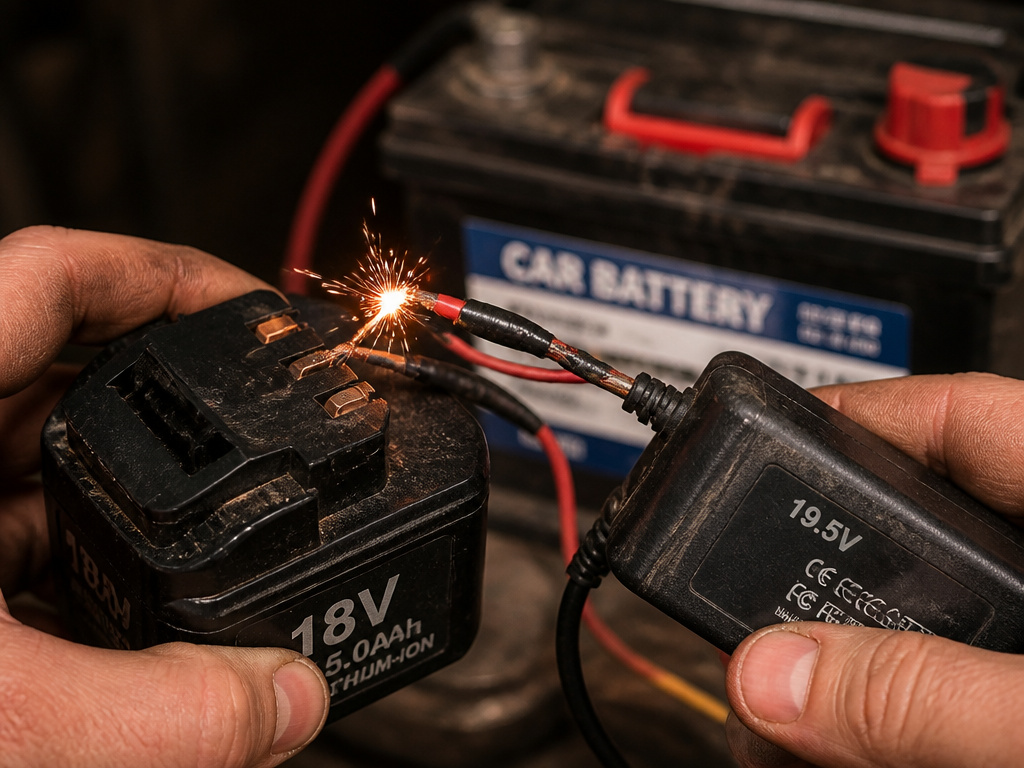 The internet is full of dangerous advice. Here’s how to spot it and why it fails.
The Mismatched Laptop Charger Hack
The claim: “Use a 19.5V laptop charger. Splice the wires and connect directly.” The reality: This is a fixed-voltage source. If the battery’s voltage is lower (e.g., 17V), the charger may deliver uncontrolled high current until its internal protection trips. If the voltages are close, it might slowly raise the battery voltage but will never execute the CV taper, leaving the battery in a state of high stress. This is how you get a battery that seems charged but dies after 5 minutes of use.
Jump-Starting from Another Battery
The claim: “Use a car battery or another drill battery to give it a boost.” The reality: This directly shorts a high-current source into your battery. Without current limiting, you can pump dozens of amps into the pack, heating the internal welds and potentially causing a thermal runaway. This method has a place in emergency car starts, but that’s a controlled, short-duration load—not a charge cycle. Our guide on how to jump a car with a drill battery details the specific, brief procedure for that unique scenario.
The “Universal” Charger Trap
Third-party “universal chargers” often claim to fit Bosch GBA 18V, Milwaukee M18, and others. Their quality is a lottery. A good one has a proper CC/CV circuit and temperature monitoring. A bad one is just a transformer in a box. Without a reputable brand name, you’re trusting your $100 battery to a $15 circuit board.
| Risky Method | Why It Fails | Likely Outcome |
|---|---|---|
| Laptop Charger (Direct Wire) | Fixed voltage, no current limit or CV phase. | Undercharging, cell imbalance, protection circuit lockout. |
| Car Battery Jump | Massive, uncontrolled current inrush. | Internal welds melt, cells overheat, potential venting. |
| Cheap Universal Charger | Unknown charge algorithm, poor voltage regulation. | Overcharge, reduced battery lifespan, fire risk. |
Easy to miss: A battery that’s been stored fully discharged for over a year. The cells can drop below a safe voltage threshold (2.5V–3.0V per cell). Applying a normal charge voltage to a deeply depleted cell causes rapid heating and plating of lithium metal, which is a direct fire hazard. If your battery reads below 12V for an 18V pack, it’s likely unrecoverable.
When to Stop: Signs of a Failing Battery
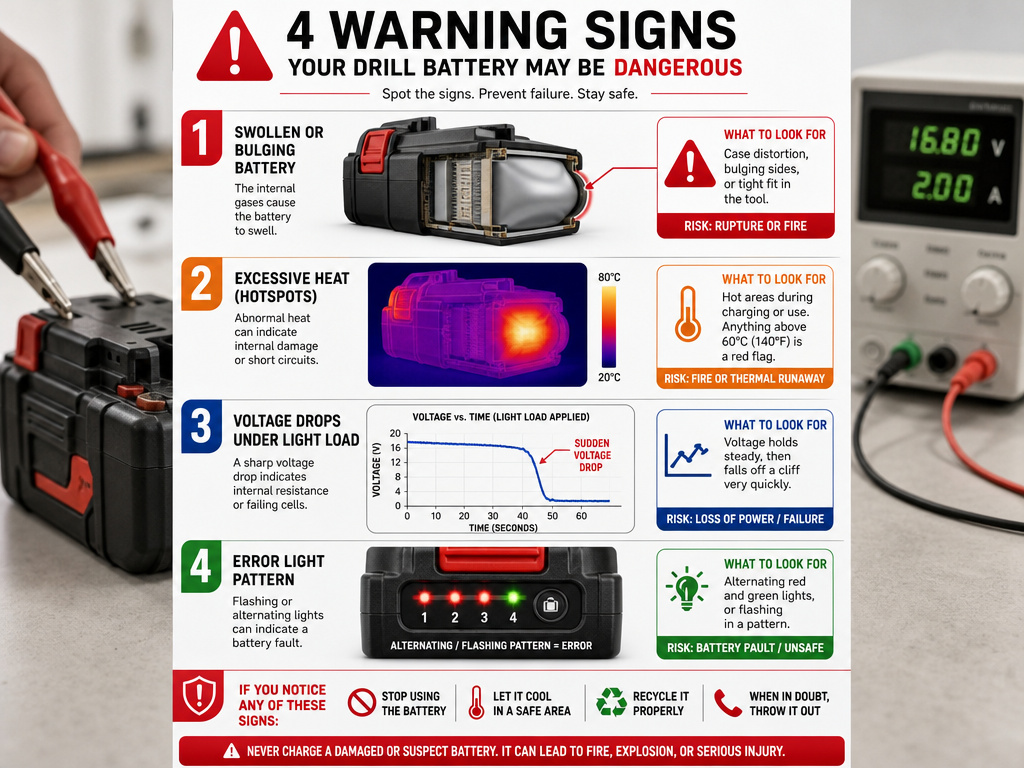 Charging won’t fix physical damage. Know the point of no return.
- Swelling: Any bulge in the battery case means internal gas buildup. Stop using it. Do not charge it. Dispose of it properly.
- Extreme Heat: If one spot on the battery is significantly hotter than the rest during charging, a single cell is failing.
- No Voltage Recovery: After a full charging cycle (using a proper method), the voltage plummets as soon as you put a light load on it (like trying to run the drill for a second). The cells are dead.
- Error Lights: Many smart chargers and tools will flash error codes (like alternating lights on a Milwaukee pack) to indicate a temperature fault or communication failure. A bench supply can’t reset these.
If you see these signs, the battery is a candidate for recycling, not revival. Your time is better spent selecting new cordless tools known for reliable battery systems.
Frequently Asked Questions
Can I use a car battery charger to charge my drill battery?
No. A standard 12V car battery charger is designed for lead-acid batteries and uses a completely different charge profile (bulk/absorption/float). Its voltage can exceed 14V, which is both too low for an 18V Li-ion pack and applied in an unsafe way. Using it risks damaging the drill battery’s internal management circuit.
How can I tell if my drill battery is 18V or 20V?
They are the same thing. It’s a marketing distinction. The nominal voltage (the average voltage during discharge) is 18V. The maximum initial voltage (fresh off the charger) is 20V. Manufacturers like DeWalt use “20V MAX” on the label, while others like Bosch use “18V.” Always trust the multimeter reading, not the label, for your actual voltage setting.
My battery has a third, small terminal. What is it?
That’s a communication/data terminal for a smart charger. It allows the charger to read battery temperature, cell balance, and cycle count. You cannot use this terminal with a bench power supply. You must charge through the main positive and negative terminals. The presence of this terminal means your battery has some internal protection, which is good, but it also means a dumb power supply cannot communicate with it to terminate the charge perfectly.
Is it safe to leave a battery charging on a bench supply overnight?
Absolutely not. This is an unsupervised, manual process. You must monitor the voltage and current, especially during the final CV stage. Leaving it unattended risks overcharging if your voltage limit is set too high or if a cell fails and begins to overheat. Plan to be present for the entire charging time, which could be 1-3 hours.
Will charging this way void my battery’s warranty?
Yes, 100%. Using a non-OEM charger or method almost always voids the manufacturer’s warranty. Brands like Milwaukee and Bosch design their chargers and batteries as a sealed system for safety and performance. If the battery fails later, even if unrelated, they can trace damage from incorrect charging. Only do this if the battery is out of warranty and the alternative is throwing it away.
The Bottom Line
Charging a drill battery without its original charger is a technical stopgap, not a permanent solution. The bench power supply method works because it replicates the essential CC/CV algorithm. Every other shortcut, from laptop chargers to jumper cables, trades safety for convenience and usually destroys the battery in the process.
Your best path forward is to buy a replacement OEM charger or a high-quality, brand-specific third-party unit. It’s the only way to guarantee temperature monitoring, proper termination, and long-term battery health. For a one-time emergency fix on an old battery, follow the steps above with precision and caution. Then, invest in the right gear for next time.
