
How to Use an Impact Driver Drill: Key OEM Safety Warnings
This post contains affiliate links. As an Amazon Associate, we earn from qualifying purchases.
You cannot use an impact driver as a drill for making holes. The operator’s manual for tools like the Ryobi R86037 and PSBID02 explicitly states, “The impact driver is not designed to be used as a drill.” Using it to drill voids the warranty, risks damaging the tool’s internal mechanism, and can cause injury due to lack of control. For drilling holes, you need a drill with a chuck and a clutch.
That warning isn’t a suggestion. It’s a liability shield printed because the tool’s design, a 1/4″ hex collet and a hammering impact mechanism, is wrong for the steady, rotational force needed to cut a clean hole. The impact action is for driving fasteners, not for precision.
This guide walks through what that manual warning actually means, how an impact driver works, and the single exception where you might get away with using it like a drill. You’ll get the manufacturer specs, the mechanical reasons behind the rules, and a clear comparison to a standard drill so you pick the right tool every time.
Key Takeaways
- OEM manuals explicitly forbid drilling. Ryobi, Milwaukee, and DeWalt impact driver manuals all state the tool is not designed for drilling. Ignoring this voids warranties and risks tool damage.
- The 1/4″ hex collet is for bits, not drill bits. It lacks the gripping power of a drill chuck, so twist drill bits can spin freely, damaging the bit’s shank and the collet.
- Impact mechanism destroys drill bits. The hammering action that drives long screws will shatter standard HSS or masonry drill bits, sending metal shards flying.
- Use a cordless drill for holes. A drill has a chuck, a clutch to prevent over-tightening, and variable speed control suited for starting and finishing a clean hole.
- The only exception: self-drilling screws. Impact drivers excel at driving screws that drill their own pilot hole, like lag screws or Tek screws into metal.
The OEM Warning: Why It’s Not a Drill
Do not use the impact driver as a drill. The impact driver is not designed to be used as a drill. – Ryobi R86037 18V Impact Driver Operator’s Manual
That sentence appears verbatim in multiple Ryobi impact driver manuals. It’s not buried in fine print. It’s a standalone safety warning. When a manufacturer prints that, they are drawing a legal and engineering line. Using the tool outside its designed purpose, like trying to drill a 1/2″ hole through a stud, invalidates any warranty claim when the anvil or gearbox strips out.
The warning exists because the physics are wrong. An impact driver delivers rotational force in sudden, concussive bursts. A drill delivers smooth, continuous torque. Forcing a drill bit through material needs the latter. The hammering action of an impact driver doesn’t help a drill bit cut; it jams the flutes, overheats the metal, and typically snaps the bit at the shank.
Where this goes sideways: You try to drill a pilot hole with a 1/8″ bit. The bit binds in the wood. The impact mechanism engages, hammering the stuck bit. Instead of cutting, the bit snaps flush with the surface. Now you have a piece of hardened steel embedded in your workpiece, and you need a screw extractor to get it out.
The 1/4″ Collet Limitation
Look at the business end of your impact driver. It has a 1/4″ hex quick-release collet. It’s designed to hold screwdriver bits and socket adapters with a hexagonal shank. Now look at a standard twist drill bit. It has a smooth, cylindrical shank.
The collet cannot grip a round shank securely. Under the torsional stress of drilling, the drill bit will spin inside the collet. This grinds down the bit’s shank, scores the inside of the collet, and generates metal filings that jam the release mechanism. You might get one or two holes before the bit slips completely, ruining your workpiece and the tool. A proper drill has a 3-jaw chuck that tightens evenly around the round shank, providing the grip needed for drilling.
How an Impact Driver Actually Works
To understand why it’s bad for drilling, you need to know how an impact drill works. Inside the housing, there are two main assemblies: a rotating motor and a hammer mechanism.
The motor spins a weighted anvil. When resistance meets the bit, like when a screw head seats flush, the anvil begins to cam back and spring forward, striking the output drive. This delivers a series of high-torque impacts. A Ryobi PSBID02 can deliver up to 3,900 impacts per minute on top of its 3,000 RPM.
| Component | Function | Why It’s Bad for Drilling |
|---|---|---|
| Hammer & Anvil | Generates concussive rotational impacts. | Shatters brittle drill bits; causes bit walk on hard surfaces. |
| 1/4″ Hex Collet | Holds screwdriver bits and socket adapters. | Cannot grip round drill bit shanks; leads to slippage and damage. |
| High RPM (0-3,000) | Provides fast screwdriving speed. | Too fast for starting a drill bit; leads to immediate bit walk. |
| No Clutch | Delivers maximum torque until stall. | No torque control; over-drives and breaks small drill bits instantly. |
This internal mechanism of an impact drill is a genius solution for one problem: driving long fasteners quickly. It is a terrible solution for creating a precise, clean hole. The impact driver vs drill distinction is mechanical, not philosophical.
Impact Driver vs. Drill: The Functional Split
This isn’t about having two tools. It’s about having a tool for rotational force and a tool for impact force. Their jobs don’t overlap.
For a complete breakdown, see our guide on the cordless drill vs impact driver decision. The short version is in this table:
| Task | Impact Driver | Cordless Drill | Winner |
|---|---|---|---|
| Drilling holes (wood, metal, plastic) | Not designed for it; high risk of failure. | Primary function; uses chuck and clutch. | Drill |
| Driving long screws & lag bolts | Excellent; impact mechanism prevents cam-out. | Possible, but risks stalling or stripping head. | Impact Driver |
| Driving many small screws | Fast, but can over-torque and strip heads. | Good; clutch can be set for consistent depth. | Drill (with clutch) |
| Fastening/loosening nuts & bolts | Excellent with socket adapter. | Poor; lacks impact force for stubborn bolts. | Impact Driver |
| Precision work | Poor; lack of control and high start speed. | Good; variable speed trigger allows finesse. | Drill |
If your primary need is making holes, you need to learn how to use a drill. The process for using a cordless drill involves selecting the correct bit, setting the clutch, and using the variable speed trigger, none of which are features on an impact driver.
The One Exception: Self-Drilling Screws
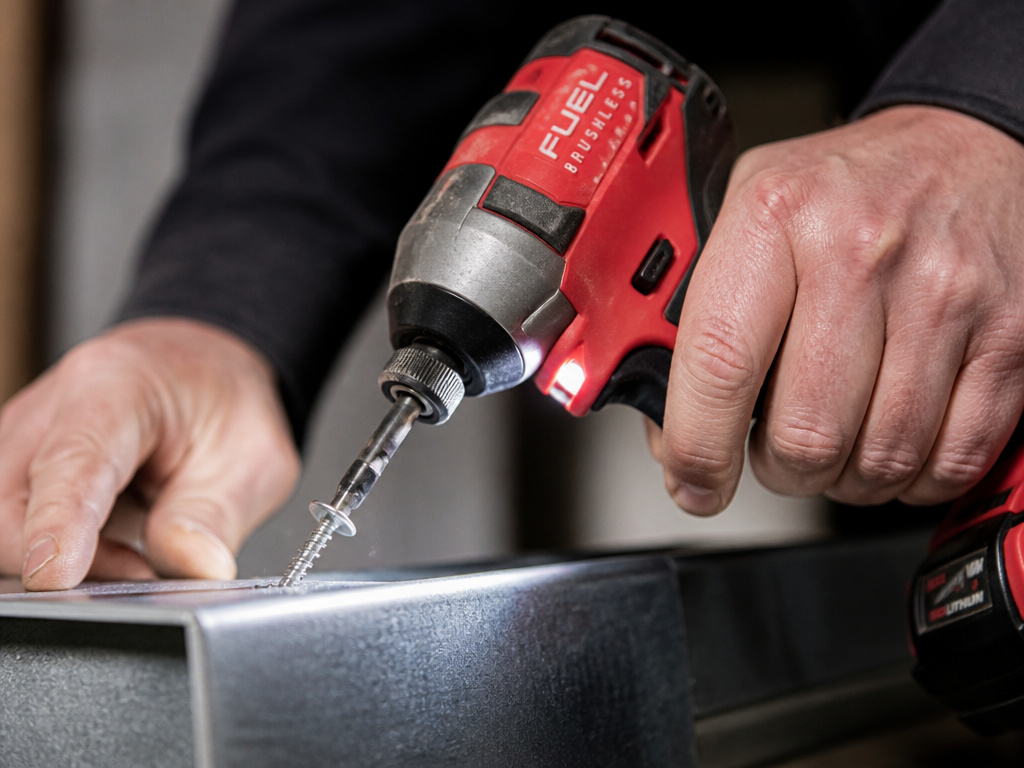
There is a gray area that confuses people. An impact driver is the best tool for driving self-drilling screws. These are screws like Tek screws or certain lag screws that have a drill-bit-like tip. They drill their own pilot hole as they’re driven.
The exception proves the rule. You’re not using the impact driver to drill a hole. You’re using it to drive a fastener that happens to create its own hole. The impact mechanism is still acting on the screw, not on a separate drill bit.
This is a key functional distinction between drill and impact driver. The tool’s job remains fastener installation. The screw’s design does the cutting work. For this, use robust impact driver bits made from S2 steel, as standard bits will snap under the torque.
Proper Impact Driver Technique

Since you now know it’s not a drill, here’s how to use it correctly for its intended common impact drill tasks.
Before you start: Wear safety glasses meeting ANSI Z87.1. The tool is loud, wear hearing protection for extended use. Ensure your workpiece is secure and clear of hidden wiring.
- Select the right bit. Use only impact-rated bits. Insert it fully into the 1/4″ collet until it clicks. Tug on it to confirm it’s locked.
- Set the direction. The forward (clockwise) setting drives screws in. The reverse (counter-clockwise) setting removes them. Never change this while the tool is running.
- Start slow. Place the bit securely in the screw head. Gently squeeze the variable-speed trigger to start the screw. This prevents the bit from jumping out and marring the screw head (cam-out).
- Let the tool work. As the screw meets resistance, you’ll hear the impact mechanism engage, a rapid brrrrrp sound. Apply firm, straight pressure and let the impacts do the work. Do not lean on the tool.
- Stop on time. Release the trigger the moment the screw head is flush. The electric brake will stop the bit quickly. Over-driving can strip the material or break the bit.
For driving many screws, techniques for using a drill for screws apply, but the impact driver removes the need for a pilot hole in most wood and is essential for dense materials.
Gear & Maintenance
Your tool is only as good as your accessories. Don’t use a $2 bit in a $150 tool.
- Bits: Invest in a set of top-rated impact driver bit sets from brands like DeWalt, Milwaukee, or Makita. Look for torsion zones and hardened steel.
- Sockets: For bolt work, use impact-rated socket adapters and sockets. Standard chrome sockets can shatter under impact force.
- Battery: Use the manufacturer-specified battery. A higher amp-hour (Ah) battery provides longer runtime but doesn’t increase power.
- Cleaning: Keep the collet clean. Blow out dust and metal shavings with compressed air after use. A jammed collet won’t release bits.
TL;DR: Buy good bits. Keep the collet clean. Store the battery indoors.
Frequently Asked Questions
Can I put a drill bit in an impact driver?
You can physically insert a hex-shank drill bit, but you shouldn’t. Standard twist drill bits are not designed for impact forces and will likely break. If you must, use only impact-rated hex-shank drill bits, which are specifically hardened to withstand the hammering action.
What happens if I use my impact driver as a drill?
You risk breaking the drill bit, damaging the tool’s collet, voiding the warranty, and causing injury from flying metal shards. The tool is also harder to control for precision drilling, increasing the chance of damaging your workpiece.
Why does my impact driver have a drill bit icon?
Some models have multiple speed/torque settings. A “drill bit” icon often denotes the highest speed/torque mode for driving the largest fasteners. It is not an instruction to use the tool for drilling holes. Always refer to the written manual, not just the icons.
Can I use an impact driver to mix paint or mortar?
No. The impact mechanism provides pulsed power, which is terrible for creating a smooth, consistent mix. It will splash material everywhere. Use a dedicated drill with a mixing paddle on a low-speed, high-torque setting.
My impact driver isn’t impacting. What’s wrong?
First, ensure you’re applying enough pressure, the mechanism only engages under load. If it still doesn’t impact, the internal hammer or spring may be broken. This is a common failure if the tool is used to drill, as the continuous load can wear out the impact components prematurely.
The Bottom Line
An impact driver is a specialist. Its job is to deliver high torque to fasteners via a hammering action. A drill’s job is to create holes via smooth rotation. The manufacturer’s warning is clear because the tools are mechanically different.
For your shop: own both. Use the drill for drill operation basics like holes and precise screw driving. Use the impact driver for lug nuts, deck screws, and lag bolts. Trying to make one do the other’s job breaks things. It’s that simple.
