
How to Use the Drill Doctor 750X for Perfect Sharpening Results
This post contains affiliate links. As an Amazon Associate, we earn from qualifying purchases.
To use a Drill Doctor 750X, set the point angle (118° or 135°), adjust the material take-off (MTO) knob for the amount of wear, and align the bit using the white guide lines on the chuck. The machine’s 15,000 RPM diamond wheel does the grinding, but those three settings decide whether you get a factory-sharp point or a bit that wanders and burns.
Most guides treat the 750X like a black box: insert bit, get sharp bit. They skip the part where a half-degree misalignment on the chuck turns a $12 cobalt bit into a spinner that burns wood instead of cutting it. The difference between a clean hole and a smoky, wandering mess isn’t the machine, it’s matching the bit’s original geometry, which the manual calls “variable alignment.”
What follows is the setup most videos gloss over, the two mistakes that ruin bits, and the one adjustment that extends wheel life by months.
Key Takeaways
- Set the point angle before anything else. A 118° bit sharpened at 135° will cut slower and overheat in metal.
- Use the material take-off (MTO) knob to control grinding depth. Start at 0.015″ for a dull bit; a setting over 0.025″ removes too much carbide and shortens bit life.
- Perfect chuck alignment is non-negotiable. The bit must sit flush against the drill stop and the chuck’s white lines must align with the cam guide before you start grinding.
- The diamond wheel wears fastest on bits under 1/4″. For small diameters, use the 100-grit coarse wheel first, then finish with the 180-grit fine wheel.
- Never use the 750X on DC power or with a voltage converter. The motor is rated for 115V/60Hz or 230V/50Hz AC only; mismatched voltage voids the warranty and can overheat the armature.
The 3-Setting Alignment That Cuts Clean Again
The Drill Doctor 750X isn’t a magic box. It’s a jig that holds a drill bit at a precise angle against a spinning diamond wheel. Your job is to give it the right angle, the right bite, and the right starting position. Get one wrong and the bit comes out lopsided, dull, or worse, shorter.
Before you start: The 750X generates metal dust and operates above 85 dB. Always wear ANSI Z87.1 safety glasses and a NIOSH-approved dust mask. The chuck and bit get hot during sharpening; let them cool before handling.
The machine’s certification to IEC 61029-1 and EN ISO 12100:2010 means its safety systems are tested, but your setup dictates its performance. The three settings are your control panel.
What Are the Three Critical Drill Doctor 750X Settings?
Every sharpening job starts with these three adjustments. They’re printed on the machine, but most people set them once and forget them.
- Point Angle. This is the included angle at the tip of the bit. The 750X adjusts from 115° to 140°. Most standard jobber bits are 118°; most cobalt and titanium bits for metal are 135°.
- Material Take-Off (MTO). This knob controls how much metal the wheel removes per pass. It adjusts from 0 to 0.040 inch, with each mark representing 0.005″.
- Chuck Alignment. This is the step everyone rushes. The bit must be clamped at its narrowest point by the chuck jaws, and the chuck’s white alignment lines must be centered on the silver cam guide above the sharpening port.
Skipping the point angle check is the most common error. You might get a sharp edge, but the wrong angle changes the cutting geometry. A 118° bit sharpened to 135° will have a shallower, more obtuse point. It requires more downforce to start a hole and generates more heat in metal.
| Setting | Typical Use | Risk If Wrong | Visual Check |
|---|---|---|---|
| Point Angle | 118° for wood/soft metal; 135° for hard metal/stainless | Bit drills slower, overheats, loses temper | Compare to a new bit or angle gauge |
| MTO (0–0.040″) | 0.015″ for dull; 0.005″ for touch-up | Removes too much carbide, shortens bit life | Measure tip before/after with calipers |
| Chuck Alignment | White lines centered on cam guide | Uneven grinding, won’t cut, burns material | Spin chuck; lines should not drift |
Why the 750X Grinds at 15,000 RPM
The motor spins the diamond wheel at 15,000 RPM. That speed creates the clean, consistent grind a hand file or bench grinder can’t match. But it also means any misalignment is amplified. A bit that’s off-center by a hair at that speed gets a lopsided edge in under three seconds.
The high RPM is why you must use the chuck correctly. Forcing the bit or not seating it against the drill stop lets it vibrate. That vibration translates into a chattered edge that looks sharp under a magnifier but tears wood fibers and dulls after two holes in steel.
Step-by-Step: Sharpening a Twist Bit from Dull to Done
This isn’t a generic sharpening tutorial. This is the sequence for the 750X, where the machine’s design dictates the order of operations. Reverse the steps and you’ll spend ten minutes re-grinding a bit you just sharpened.
1. Identify and Set the Point Angle
Find the original angle. If you don’t know, compare it to a new bit or set the 750X to 118° as a default. Loosen the point angle adjustment knob on the side of the unit, rotate the dial to your angle, and re-tighten. The dial clicks at the standard 118° and 135° positions.
2. Adjust the Material Take-Off (MTO)
Turn the MTO knob counter-clockwise until it stops, this is the maximum 0.040″ setting. For a moderately dull bit, turn it clockwise three clicks to 0.015″. For a light touch-up on a bit that’s just lost its edge, go to 0.005″. Write your starting setting on a piece of tape on the machine if you’re doing multiple bits; it’s easy to lose track.
Where this goes sideways: Setting the MTO too high on a small-diameter bit. A 3/32″ bit sharpened at 0.025″ loses a significant portion of its flute length in one go. You might get two sharpens before the bit is too short to use.
3. Insert and Align the Bit
Open the chuck jaws by pressing the silver button on the chuck. Insert the bit shank until it hits the metal drill stop at the back. While holding the alignment button, rotate the chuck until the jaws clamp the bit at its narrowest point, you’ll feel it seat. Release the button.
4. Engage the Sharpening Cycle
Turn the power on. Align one of the white lines on the chuck with the silver cam guide directly above the sharpening port. Press down lightly and rotate the chuck clockwise. You’ll feel a wavy, cam-driven motion. This is correct; it creates the relief behind the cutting edge. Keep grinding until the abrasive sound stops, usually 20-30 seconds.
5. Split the Point (Optional)
For better centering in metal, use the split point port on the side. Insert the bit, give it a half-turn until it stops, and remove it. Do not force it; the port has a hard stop to prevent over-splitting.
6. Cool and Inspect
Unplug the unit. Remove the bit, it will be warm. Let it cool before testing. The cutting edges should be symmetrical and shiny. If one lip is taller than the other, the bit was not aligned correctly in the chuck jaws. Re-clamp and grind for 5-10 seconds to even it out.
The Two Mistakes That Ruin Bits and Wheels
You can follow every step and still wreck a bit or wear out the diamond wheel prematurely. These aren’t errors in the manual; they’re outcomes of misunderstanding how the 750X applies abrasive.
Mistake 1: Grinding Coated Bits Without a Coarse Wheel
Black oxide and titanium nitride are coatings, not the base metal. The 180-grit fine wheel that comes installed is designed for sharpening HSS and cobalt steel. Trying to grind through a titanium coating with it loads the wheel with coating material, glazing it over. The bit gets hot, the wheel stops cutting, and you think the machine is broken. The fix is the optional 100-grit coarse wheel. It cuts through the coating quickly, then you switch back to the 180-grit for the final edge. For drill bit sharpening coated tools, start coarse.
Mistake 2: Using the Wrong Extension Cord
The 750X draws 1.75 amps max. Use an undersized or too-long extension cord, and voltage drop causes the motor to lose power and overheat. The manual includes a table, but the rule is simple: for a 50-foot cord, use 16-gauge wire minimum. For 100 feet, step up to 14-gauge. A motor that bogs down mid-sharpen is often a cord problem, not a machine problem. This is the same principle that affects any using a Drill Doctor, consistent power matters.
118° vs 135°: Which Point Angle for What Material?
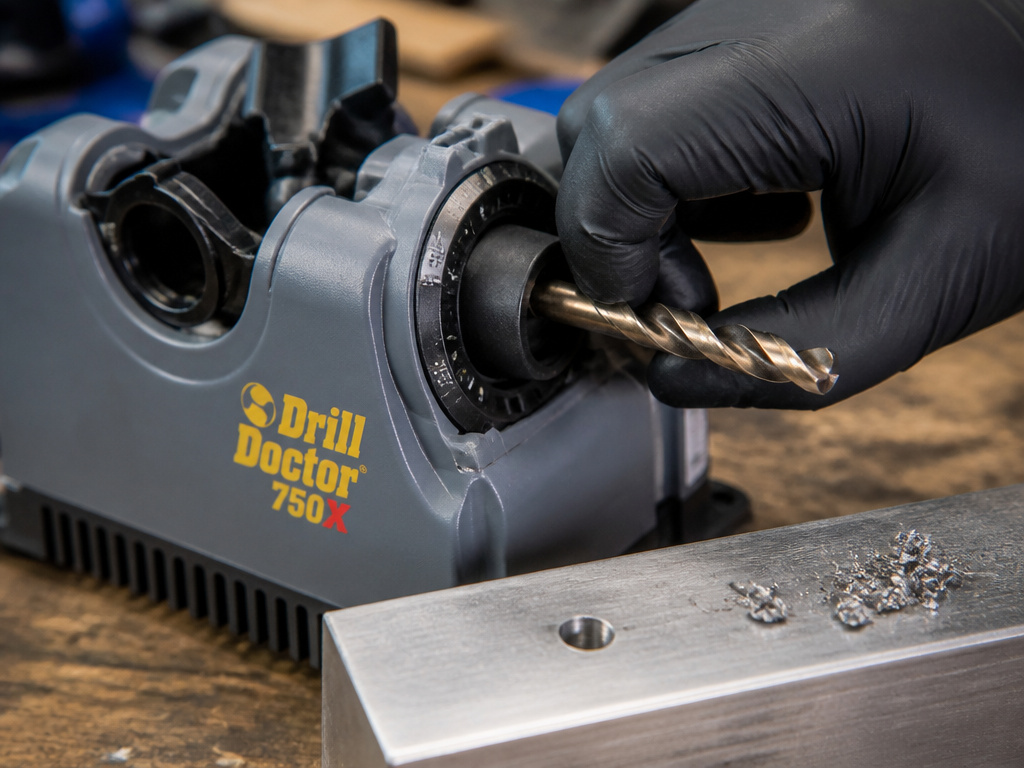
The point angle isn’t a suggestion. It changes how the bit’s cutting lips engage the material.
| Angle | Best For | Performance | Worst For |
|---|---|---|---|
| 118° | General-purpose wood, plastic, soft metals (aluminum, brass) | Fast cutting, lower thrust pressure required | Hardened steel, stainless steel |
| 135° | Hard metals, stainless steel, cast iron | More durable tip, resists walking on curved surfaces | Softwoods (can cause tear-out) |
A 135° point has a flatter, more robust tip. It’s less likely to “walk” or skitter on hard, curved surfaces like pipe or bar stock. The trade-off is it requires more downforce to start a cut in wood. If you primarily drill wood but occasionally need metal, keep a set sharpened at 118° and a separate set at 135°. Don’t re-angle the same bits back and forth; you’ll remove too much material.
For the most common homeowner tasks, shelf brackets, deck screws, general woodworking, the 118° setting is correct. If you’re drilling into steel beam or stainless, the 135° setting is non-negotiable. The wrong angle won’t just drill poorly; it will work-harden stainless steel, making it nearly impossible to penetrate with a subsequent bit.
Maintaining Your 750X: The 5-Minute Clean-Out That Saves the Motor
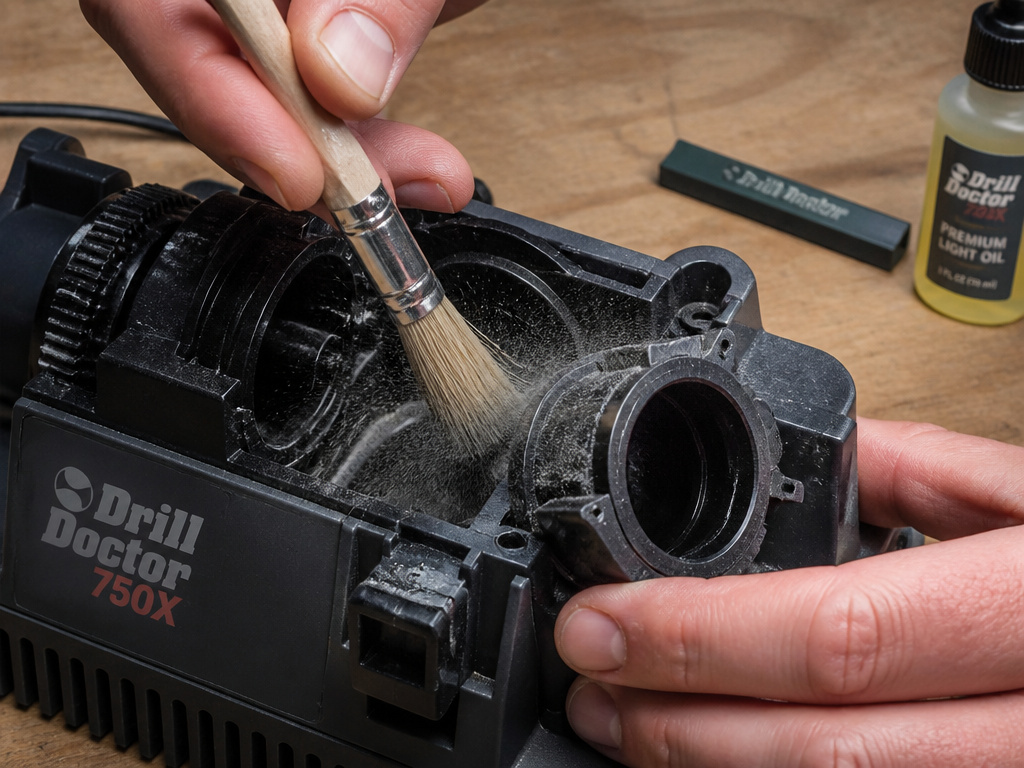
The 750X is not a set-and-forget tool. Metal dust accumulates inside the housing, around the motor vents, and in the chuck mechanism. That dust is conductive and abrasive.
Every ten sharpening sessions, unplug the unit and brush out the interior with a dry paintbrush. Pay attention to the vents on the bottom and back. Compressed air works, but hold the can upright to avoid spraying moisture inside. Check the diamond wheel for loading, a shiny, glazed surface where the abrasive is clogged with metal. A loaded wheel cuts poorly and heats the bit. The fix is a dressing stick (sometimes called a wheel dresser) rubbed lightly against the spinning wheel with the unit unplugged and the wheel exposed.
The chuck jaws also collect grit. A drop of light oil on the jaw threads and the cam mechanism every few months keeps the action smooth. A sticky chuck is the main cause of misalignment, which leads directly to the most common Drill Doctor sharpening process complaint: “My bit came out worse than it went in.”
Frequently Asked Questions
Can the Drill Doctor 750X sharpen masonry bits?
No. The 750X is designed for sharpening standard twist-style drill bits from 3/32″ to 3/4″. Masonry bits have a carbide tip brazed onto a steel body, and the diamond wheel will destroy the carbide and not effectively sharpen the steel. For masonry bits, use a dedicated grinder sharpening method or replace them.
Why does my newly sharpened bit wobble in the drill?
Wobble indicates an off-center grind, almost always due to incorrect chuck alignment. The bit was not clamped at its absolute narrowest point, or it wasn’t seated fully against the drill stop. Re-clamp the bit, double-check the white alignment lines are centered, and take a light 5-second grind to true it up.
How many times can I sharpen the same drill bit?
It depends on the bit’s original length and how much material you remove each time. With the MTO set to 0.005″ for touch-ups, you can sharpen a standard jobber bit 15-20 times. If you’re grinding at 0.020″ or more to repair a chipped edge, you might get only 5-6 sharpens before the flutes are too short to eject chips.
Can I use the 750X to sharpen other tools like chisels or screwdrivers?
No. The manufacturer’s manual explicitly states the tool is “not intended to sharpen chisels, screwdrivers, or other similar shop tools.” The jig and wheel are engineered specifically for the geometry of a drill point. Attempting to sharpen anything else can damage the wheel, the tool, and void the warranty.
What’s the difference between the 750X and sharpening on a bench grinder?
The 750X is a dedicated jig that guarantees a consistent point angle and cutting lip relief with minimal skill. A bench grinder is faster but requires a practiced hand to maintain geometry and avoid overheating the bit. The 750X is repeatable; the grinder is flexible but has a steeper learning curve.
Before You Go
The Drill Doctor 750X turns a pile of dull bits back into working tools, but only if you respect its three settings. Point angle first, then MTO, then perfect alignment. The machine’s 15,000 RPM wheel and certified safety design do the grinding, but you control the geometry. Keep the interior clean, match the wheel grit to the bit material, and use a heavy enough extension cord. Forget the myth that it’s a magic box, it’s a precision jig. Treat it like one, and it will pay for itself the first time you salvage a 3/4″ cobalt bit instead of buying a new one.
