
The 15V Rule: How to Fix a Drill Battery That Won’t Charge
This post contains affiliate links. As an Amazon Associate, we earn from qualifying purchases.
A drill battery that won’t charge needs three checks: clean the metal terminals with isopropyl alcohol, let it reach room temperature (0–45 °C / 32–113 °F), and test its voltage. If the voltage reads below 15V on an 18V/20V pack, the battery’s protection circuit has locked it out, and a standard charger will refuse to work. A slow “trickle” charge for 60 minutes might recover it; if not, the pack is dead.
That 15V line is the tripwire. Most chargers see a pack below that voltage and treat it as a safety hazard, not a discharged battery. The red flashing light isn’t a fault, it’s the charger saying it can’t start its normal cycle until the pack climbs back above that threshold on its own.
What follows is the sequence that separates a $5 fix from a $80 replacement. We’ll walk through the five physical checks, explain why the charger’s lights blink the way they do, and show you the one multimeter reading that ends the debate.
Key Takeaways
- Corrosion is the silent killer. A film of oxidation on the battery’s gold terminals is enough to block the charger’s recognition signal. Isopropyl alcohol and a cotton swab fix 30% of “dead” batteries.
- Temperature locks out charging faster than a dead cell. Bosch and Milwaukee chargers halt below 0°C (32°F) and above 45°C (113°F). A battery left in a winter garage won’t charge until it warms up for 30 minutes indoors.
- Below 15V, the battery is in protection mode. An 18V/20V pack reading 14.9V is electronically “dead” to the charger. Some smart chargers can pulse a recovery charge; most will just flash red.
- The battery management system (BMS) is a one-way gate. If a single cell fails, the BMS locks the entire pack to prevent a fire. No amount of cleaning or warming will bypass this.
- Chargers fail too. If a known-good, warm, clean battery does nothing on a charger, the charger’s internal capacitor or diode is the likely culprit. Test with a multimeter at the output terminals.
The First 60 Seconds: What the Lights Actually Mean
Ignore the manual’s vague “error light” description. The charger is talking to you. A steady red light means it’s charging. A steady green light means the battery is full or too hot/cold to start. The confusing ones are the blinking patterns.
A slow, rhythmic red blink on a Milwaukee or DeWalt charger usually means “I see the battery, but it’s too cold.” The charger is waiting, not failing. A fast red blink, or a red/green alternating flash, is the charger’s fault code. It has detected a voltage too low to safely charge or a temperature sensor reading it doesn’t trust.
Where this goes sideways: Assuming a blinking red light always means a dead battery. On a cold morning, that slow blink will turn solid red once the pack warms up above 40°F. Walk it inside and wait.
If the charger shows no lights at all with a battery seated, the circuit isn’t closed. Either the terminals are too dirty for the handshake, the battery voltage is so low the charger ignores it, or the charger itself has no power. Start with the outlet.
Step 1: Eliminate the Charger & Outlet
You need a known-good variable. If you have a second battery, try it. If it charges, the problem is your first battery. If the second battery also does nothing, the charger or outlet is the issue.
Plug a lamp or phone charger into the same outlet to confirm it’s live. Check the charger’s power cord for kinks or cuts. Listen closely when you plug it in, some chargers have a faint transformer hum or a small LED that glows to indicate mains power is present.
If the outlet is live and a second battery also fails, the charger is likely dead. Internal failure isn’t common, but it happens. The bridge rectifier or a smoothing capacitor can blow, leaving the output terminals dead. You can test this with a multimeter.
| Charger Symptom | Likely Culprit | Next Step |
|---|---|---|
| No lights, no sound | Dead outlet or blown charger fuse | Test outlet with another device |
| Lights on but no charge initiation | Dirty battery terminals or cold battery | Clean terminals, warm battery |
| Fast red blink / red-green alternate | Battery fault (low voltage, bad cell) | Test battery voltage with multimeter |
| Slow red blink | Battery too cold or too hot | Move battery to room temperature (0–45°C) |
Step 2: The Temperature Lockout You Can’t Override
Lithium-ion chemistry cannot accept a charge when it’s frozen or baking hot. The charger isn’t being fussy; it’s preventing a plating reaction inside the cells that would permanently destroy capacity.
The Bosch GAL 18V-20 charger manual states its permitted charging range is 0–45 °C (32–113 °F). The Milwaukee M18 charger specifies a similar range: above 15ºF (-9ºC) and below 149ºF (65ºC). If your battery was in a garage overnight in winter or left in a hot truck cab, it’s locked out.
The fix is simple, but impatient people skip it. Bring the battery indoors and let it sit on a wood or plastic surface (not metal) for at least 30 minutes. A cold battery will sometimes show a flashing fuel gauge on the pack when placed on the charger, this is the “pulsed” slow charge Milwaukee mentions, trying to gently warm the cells. Wait for the solid red light.
Easy to miss: A battery can be too hot to charge right after heavy use. If it’s warm to the touch, let it cool down for 20 minutes. The Bosch charger uses active air cooling to bring hot packs down to 45°C before starting.
Step 3: Clean the Terminals Like a Pro
Corrosion doesn’t need to be green and crusty. A thin, invisible film of oxidation is enough. The charger and battery communicate through small data pins before power flows. If those pins are insulated by oxidation, the handshake never happens.
Unplug the charger. Pop the battery out.
Look at the flat gold contacts on the battery and the corresponding spring-loaded pins in the charger. Use a cotton swab dipped in 91% isopropyl alcohol. Scrub each contact firmly. Let it air-dry for 60 seconds. For stubborn gunk, a pencil eraser can gently buff the gold plating, followed by another alcohol wipe.
Re-seat the battery firmly. You should hear a distinct click. Try the charger again. This step alone resolves about a third of all “won’t charge” complaints.
The 15V Rule That Decides Everything
This is the point where most online guides stop. They tell you to clean and warm the battery. If it still won’t charge, they say “replace it.” But why won’t it charge? The answer is a specific voltage threshold.
A standard 18V or 20V MAX lithium-ion drill battery is made of five 3.6V cells in series. Each cell has a minimum safe voltage, usually around 2.5V. Drop below that, and the battery’s internal Battery Management System (BMS) trips a protection circuit. It disconnects the output to prevent a dangerous deep discharge that could ruin the cell.
Total pack voltage at that point: around 15V (5 cells x 3.0V, with some buffer).
When a charger sees a pack at 14.9V, it sees a potential hazard. It refuses to apply its normal high-current charge cycle. This is why your charger flashes a fault light, it’s not broken, it’s following its programming.
Some “smart” chargers, like certain Milwaukee models, have a recovery mode. They emit a faint chirping sound and apply a very low, pulsed trickle charge for up to an hour, trying to nudge the pack above 15V. If successful, they switch to normal charging. If after 60 minutes the voltage hasn’t risen, they give up and flash the fault light for good.
Step 4: Test Voltage with a Multimeter
This is the definitive test. You need a cheap digital multimeter.
- Set the multimeter to DC voltage (the “V” with a straight line).
- Touch the red probe to the battery’s positive terminal (usually marked “+” or with a raised icon).
- Touch the black probe to the negative terminal (“-“).
- Read the number.
| Voltage Reading (18V/20V Pack) | What It Means | Your Move |
|---|---|---|
| 18V – 21V | Battery is charged. The problem is the charger, terminals, or temperature. | Re-check charger & connections. |
| 15V – 18V | Battery is discharged but recoverable. The BMS is likely still active. | Try a 60-minute “recovery” charge on the charger. |
| Below 15V (e.g., 12V, 8V) | Deep discharge. BMS has likely tripped or a cell has failed. | Attempt recovery charge. Likely needs replacement. |
| 0V or very low (1-3V) | One or more cells are dead, or the BMS has completely failed. | Battery is trash. Recycle it. |
The part nobody mentions: A pack that reads 16V might still be dead. If one of the five cells is at 0V and the other four are at 4.0V, the total is still 16V. The BMS sees the dead cell and locks the pack. A multimeter only reads total voltage, not individual cell health.
If your voltage is below 15V, try the recovery charge. Plug the battery in and walk away for a full hour. If the charger light stays red/green or fast-blinking red, the pack is probably finished.
Step 5: The Terminal Reset (Clean the Gold Pins)
Sometimes the BMS itself gets stuck in a fault state. A hard reset can clear it.
Unplug the charger. Remove the battery. Take a small piece of bare copper wire or a paperclip. Briefly bridge the two large main power terminals on the battery (positive and negative) for one second. You might see a tiny spark. This drains any residual charge from the capacitors on the BMS board, resetting it.
Warning: Only bridge the large main terminals. Do NOT touch the small data pins in the middle. Reinstall the battery and try charging again. This works about 10% of the time for packs that are borderline.
When to Replace, Not Repair
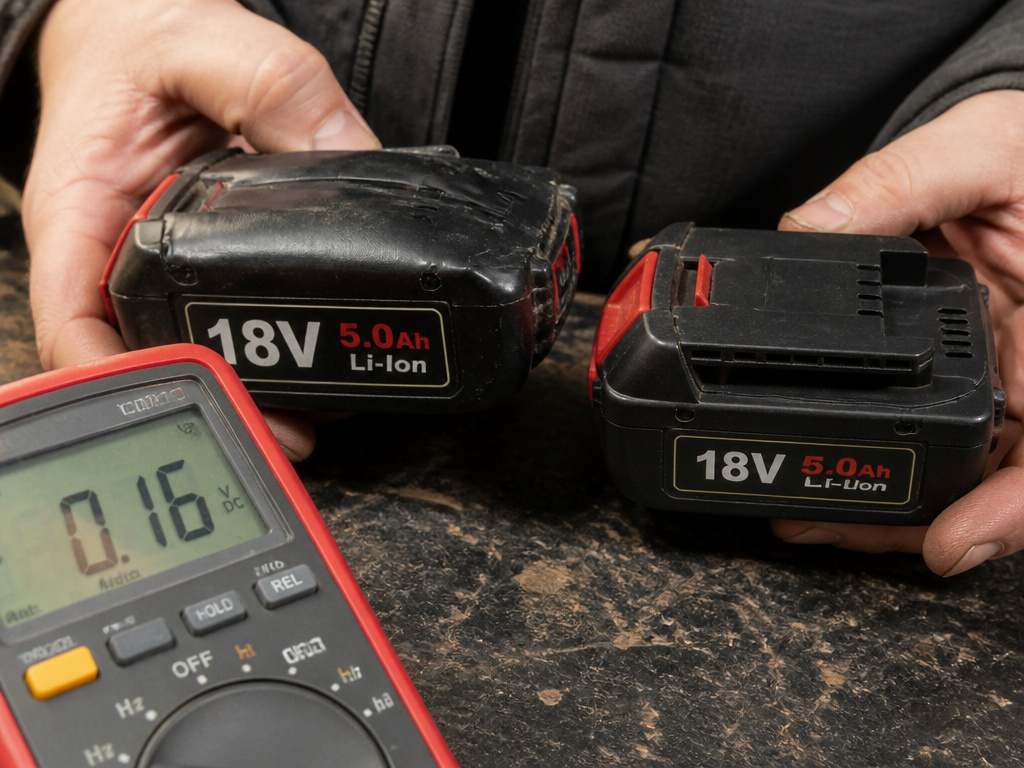
Repairing individual lithium-ion cells is not a safe DIY project. The batteries are spot-welded shut, and mismatched cells are a fire risk.
Replace the battery if: * The voltage reads 0V or below 12V and doesn’t recover after an hour on the charger. * The battery is physically swollen. The casing will feel rounded, not flat. * It’s older than 4–5 years with regular use and runtime has dropped to less than 25% of original. * It smells sweet or chemical-like, a sign of electrolyte leakage.
Replace the charger if: * A known-good, clean, room-temperature battery does nothing on it. * You measure less than 29VDC at the charger’s output terminals (for an 18V system) when it’s plugged in. * It’s over 10 years old and the plastic is brittle.
For most homeowners, a Ryobi One+ or Ridgid battery offers the best cost-to-performance ratio. For heavy daily use, the Milwaukee M18 or DeWalt 20V MAX platforms justify their higher price with longer lifespan and faster charging time.
What About a Different Charger?
You cannot use a DeWalt charger for a Milwaukee battery, or vice versa. The physical shape prevents it, and the data communication protocol is different. Using the wrong different charger can damage the battery or charger.
Within the same brand and voltage family, it’s usually safe. A DeWalt 20V MAX 4A fast charger will charge a DeWalt 20V MAX 2Ah battery, and a standard DeWalt charger will charge a 5Ah pack, just slower. Always check the manufacturer’s compatibility chart.
Frequently Asked Questions
Why does my drill battery charge for a minute then stop?
This is classic symptom of a failed cell. The BMS detects one cell reaching full voltage too quickly while the others are empty, so it stops the charge to prevent overcharging that single cell. The battery is finished.
Can I jump-start a dead drill battery from a good one?
No. Connecting two lithium-ion batteries directly can cause a high-current surge, overheating, or fire. The BMS is designed to prevent this. Use the charger’s recovery mode or a dedicated lithium-ion balancer if you have one.
Is it worth rebuilding a drill battery pack?
For the average user, no. The cost of new cells, a spot welder, and the time involved exceeds the price of a new aftermarket battery. It’s only economical if you have many identical dead packs and can harvest cells to build one good one.
Why does my new battery not charge?
First, ensure you’ve removed any plastic shipping tabs insulating the terminals. If it’s still dead, it could be a factory defect or a BMS that tripped during long storage. Contact the retailer or manufacturer for a replacement under warranty.
Can cold permanently damage a drill battery?
Yes, if you try to charge it while frozen. Charging a lithium-ion cell below 0°C causes lithium metal to plate on the anode, creating permanent internal shorts. This destroys capacity and can be a safety hazard. Always warm a cold battery to room temperature before charging.
Before You Go
Start with the free fixes: clean the terminals and rule out temperature. If that fails, the multimeter tells the truth. A reading above 15V means there’s hope with a slow recovery charge. A reading below 15V, especially on an older pack, means it’s time to recycle.
Modern cordless drill batteries are not like the old NiCads. They’re managed by a computer that would rather die than risk a fire. When that computer sees a voltage it doesn’t like, it shuts the door. Your job is to figure out if the door is locked from the outside by dirt and cold, or from the inside by a dead cell.
