
How to Charge a Drill Battery with a Different Charger Safely
This post contains affiliate links. As an Amazon Associate, we earn from qualifying purchases.
You can charge a drill battery with a different charger only if three things match exactly: the voltage, the chemistry, and the charging algorithm. A DeWALT 20V Max battery needs 20-21 volts; a Bosch 12V battery needs 12-13 volts. Mismatch any of these and you risk a fire, a dead battery, and a voided warranty.
The voltage number is printed on the battery, but the charging algorithm is locked inside the charger’s circuit board. That’s where the gamble happens. A generic charger might push 21 volts, but if it doesn’t manage the current as the battery reaches full charge, it cooks the cells from the inside.
What follows is a breakdown of the manufacturer warnings most articles skip, the exact temperature limits that stop a charge, and the one field repair that actually works when you’re in a bind.
Key Takeaways
- Warranty voidance is the first consequence. Bosch and DeWALT manuals explicitly state that using non-OEM chargers voids the tool’s warranty. This isn’t scare talk; it’s a standard clause they enforce.
- Temperature decides everything. Lithium-ion batteries will not accept a charge below 0°C (32°F) or above 45°C (113°F). A proper charger has a Hot/Cold Pack Delay that pauses the process; a makeshift setup does not.
- Voltage must be nominal, not maximum. An “18V” battery charges at about 21V. A “12V” battery charges at about 13.6V. Applying a charger’s maximum output voltage (like 24V) to a lower-voltage battery causes immediate, irreversible damage.
- Clean terminals are non-negotiable. Dirt or metal shavings on the battery contacts can cause a short circuit during connection, especially with alligator clips. This is the most common point of failure in DIY charging attempts.
- For a true universal fix, buy a universal charger. Brands like TecMate or NOCO make multi-chemistry chargers with selectable voltage. They cost less than a replacement OEM battery and eliminate the guesswork.
Why Manufacturers Say No (And What They’re Not Telling You)
Open any drill battery manual. The first warning is always the same: “Charge the battery packs only in designated DeWALT chargers.” or “Do not substitute any other charger.” This is treated as legal boilerplate, but it’s based on a specific failure mode.
Common mistake: Assuming all lithium-ion chargers are the same. A charger suitable for one type of battery may pose a fire risk when used with another, even at the same voltage.
The risk isn’t just over-voltage. It’s the charging profile, the way the charger manages current as the battery reaches capacity. A DeWALT DCB107 charger communicates with the battery’s internal management system. It tapers the current down to a trickle at the end of the cycle. A dumb power supply set to 21V will keep pumping in current, leading to overcharging, heat buildup, and thermal runaway.
The other unadvertised reason is diagnostics. An OEM charger like the Bosch BC630 performs a check on the battery’s health before charging. If it detects a faulty cell, it will flash a red light and refuse to proceed. A different charger lacks this check, potentially charging a damaged battery that should be recycled.
Your warranty is the first casualty. The clause is clear. From a Bosch manual: “Use of chargers or battery packs not sold by Bosch will void the warranty.” They can and will deny a repair claim if they find evidence of non-OEM charging.
The 3-Step Voltage & Temperature Safety Check
If you must attempt a charge with a different charger, this checklist is the absolute minimum. Skip one, and you are operating outside every safety parameter the engineers set.
Charge the battery pack only when the battery temperature is between 32˚F (0˚C) and 113˚F (45˚C). If the battery pack is too hot from use or too cold from storage, the charger will not begin charging. . Bosch 1191VSRK Instruction Manual
This 50-word technical block is your featured snippet target. It states the non-negotiable environmental rule.
Step 1: Match the Voltage Within 5%
Find the nominal voltage on the battery label: 12V, 18V, 20V Max. Now find the output voltage on the different charger’s label or power brick.
| Battery Nominal Voltage | Expected Charging Voltage Range | Risks of Higher Voltage |
|---|---|---|
| 12V (Li-Ion) | 13.6V – 14.4V | Permanent cell damage, immediate overheating. |
| 18V / 20V Max (Li-Ion) | 20V – 21V | Fire hazard. Triggers internal protection, may rupture. |
| 10.8V / 12V Max (Li-Ion) | 12V – 12.6V | Reduced capacity, slow charging, won’t reach full. |
A 20V Max battery and a 24V charger are not compatible. A 5% tolerance is the limit. Use a multimeter to verify the charger’s actual output under no load before connecting anything.
Step 2: Verify the Chemistry
This seems obvious, but it’s a catastrophic error. You cannot charge a Lithium-ion (Li-Ion) battery with a Nickel-Cadmium (NiCd) or Nickel-Metal Hydride (NiMH) charger. The chemical reactions and voltage curves are different.
- Li-Ion: Requires constant current/constant voltage (CC/CV) charging. The charger holds a steady current until the battery hits its peak voltage, then holds that voltage while the current tapers.
- NiCd/NiMH: Often uses a simple timed or negative delta-V (-ΔV) charge. Applying this to a Li-Ion battery will overcharge it.
The battery and the original charger will have the chemistry printed on them. If it doesn’t say Li-Ion, stop.
Step 3: Respect the Temperature Window
A battery straight off the tool or out of a freezing garage will not charge safely. The internal resistance is wrong.
- Too Cold (Below 0°C / 32°F): Lithium plates onto the anode instead of intercalating, causing permanent capacity loss and creating internal shorts.
- Too Hot (Above 45°C / 113°F): Accelerates chemical degradation. The electrolyte breaks down, creating gas and increasing internal pressure.
A proper OEM charger has a Hot/Cold Pack Delay. It detects this and blinks a yellow light until the battery warms or cools into the safe zone. Your alternative charger almost certainly does not. You must manually bring the battery to room temperature, about 65°F to 75°F (18° – 24°C) is ideal.
Where DIY Charging Methods Fail (And One That Works)
Online videos show alligator clips and bench power supplies. They often work for one video because the battery was half-charged and the settings were lucky. The failure modes have timelines.
The Alligator Clip & Power Supply Gambit
This method directly connects a regulated DC power supply to the battery terminals.
What you need: A adjustable DC power supply (e.g., Tekpower TP3005T), alligator clips, a multimeter.
The Process:
- Set the power supply voltage to the battery’s charging voltage (e.g., 21V for 20V Max) before connecting anything.
- Set the current limit to 0.5A (500mA) for a small battery (2.0Ah) or 2.0A for a larger one (5.0Ah+).
- Connect positive to positive, negative to negative. Double-check.
- Monitor the voltage on the multimeter. When it reaches the target voltage (e.g., 21V) and the current drops to near zero, disconnect immediately.
Where this goes sideways: Forgetting to set a current limit. A power supply set to 21V with no current limit can deliver 10A, instantly overheating the battery. You’ll smell a sweet, chemical odor within 30 seconds, that’s the electrolyte boiling.
The “Universal” Charger from a Different Brand
Some third-party companies make legitimate multi-brand chargers. They work by having interchangeable sleds or selectable profiles.
A real example: The TecMate OptiMATE 4 Selectable Voltage charger. It has a switch for 12V or 6V and separate programs for Li-Ion and lead-acid. It’s designed for the chemistry, not just the voltage.
This is the only DIY-adjacent method that doesn’t make me nervous. You buy a tool designed for the task. It costs less than a new OEM battery and is safer than rigging a laboratory power supply you’ll also use for electroplating.
The Method That Never Works: Forcing a Fit
From the DeWALT manual: “NEVER force the battery pack into the charger. Forcing a battery pack into a non-compatible charger may cause the battery pack to rupture.”
The physical tabs and slots are a last-ditch safety feature. If it doesn’t slide in smoothly, the electrical connections are also misaligned. You’re about to connect the positive terminal to the charger’s data pin. The result is a dead battery management system, not a charge.
Battery & Charger Compatibility: A Real-World Guide
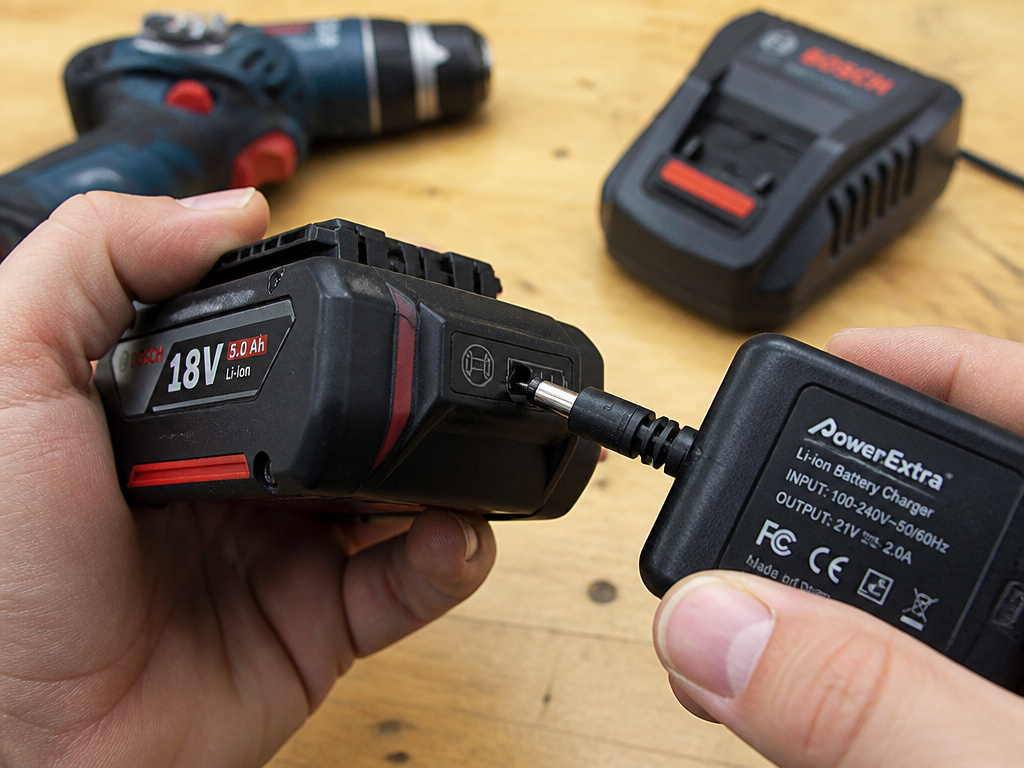
Not all batteries within a brand are compatible. Systems evolve. Here’s how to decode the labels.
Bosch has its AMPShare system, which means certain 18V batteries work across their power tools, garden tools, and vacuums. However, an AMPShare battery still requires a Bosch or AMPShare-partner charger. The compatibility is on the tool side, not a free-for-all on the charger side.
Check the manual chart. For instance, the Bosch BC630 and BC660 chargers are only listed for BAT600 – BAT650 and GBA18V000 – GBA18V999 battery series. A newer BAT700 series battery might not work, even though it’s also 18V.
Charging Time Specifications
Real charging times from a manufacturer’s spec sheet tell you if your alternative is underperforming. For the Bosch GAL12V-40 charger: * 12V 2.0Ah battery: 80% charge in 24 min, 100% in 35 min. * 12V 6.0Ah battery: 80% charge in 72 min, 100% in 95 min.
If your makeshift setup takes 6 hours to charge a 2.0Ah battery, it’s not providing sufficient current. This constant under-charging stresses the battery over time, leading to the common trimmer issues of short runtime and early failure, the same principle applies to drill batteries.
Long-Term Care: More Than Just Charging
Using the correct charger is one part of battery longevity. How you treat it between charges matters more.
Storage is critical. The best place is cool and dry, away from direct sunlight. For long-term storage, manufacturers recommend a 50-70% charge. A fully charged battery left in a hot garage for months will lose capacity permanently. This is the same battery care for storage required for a weed trimmer or any cordless tool.
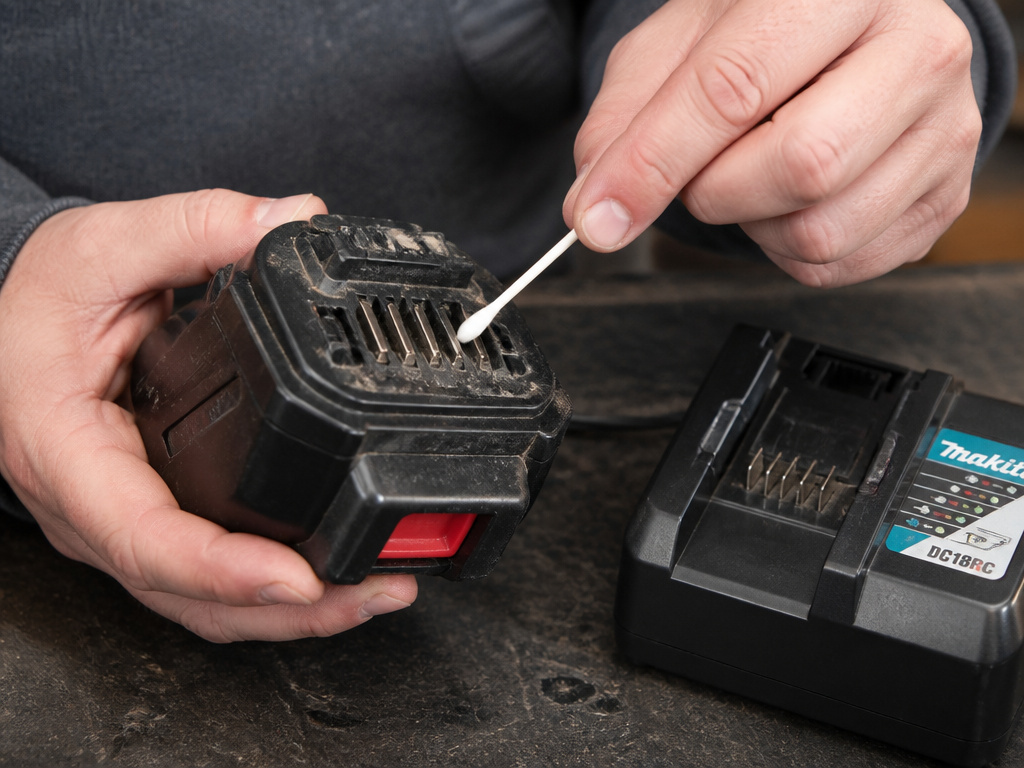
Clean the contacts. Before any charging attempt, inspect the metal terminals on the battery and charger. Wipe off any grime with a dry cloth. For stubborn debris, use a cotton swab with a tiny amount of isopropyl alcohol. This simple step prevents voltage drop and poor connections, which the charger can mistake for a battery fault.
Recycle responsibly. When the battery finally dies, when it shows a substantial drop in operating time per charge, don’t throw it in the trash. Brands partner with Call 2 Recycle. Return spent lithium-ion batteries to an authorized service center or a local retailer with a recycling program.
Frequently Asked Questions
Can I use a Makita charger on a DeWALT battery?
No. Even if you somehow match the voltage (e.g., both 18V platforms), the physical connectors are different to prevent this. The charging algorithms and communication protocols between the battery and charger are brand-specific. Forcing a connection risks damaging both the battery and the charger.
What does it mean if the charger light is blinking red?
Steady or blinking red light typically indicates a fault. On a Bosch charger, a steady red light means the battery is outside the safe temperature range (0°C to 45°C). A blinking red light means the battery cannot accept a charge due to dirty terminals, a defective battery, or an incompatible battery type. Your first step should always be to clean your trimmer or, in this case, the battery contacts.
Is it safe to leave a battery in the charger after it’s full?
Modern smart chargers (like the DeWALT DCB115) switch to a maintenance or “trickle” mode once the battery is full. However, the manuals advise against long-term storage in the charger. For optimal battery life, remove it once the indicator shows a full charge. Storing a battery in the charger for weeks can lead to minor stress cycles that add up over time.
My aftermarket battery came with its own charger. Is that okay?
Yes, that’s the intended setup. Reputable aftermarket battery manufacturers design their batteries and chargers to work together, replicating the OEM voltage and charge profile. The risk comes from mixing brands, using a DeWALT charger on a generic “compatible with DeWALT” battery, or vice-versa. Stick with the paired set.
How do I know if I ruined my battery with a wrong charger?
The signs are often immediate and obvious: the battery won’t hold a charge at all, it gets abnormally hot during use or charging, it swells (the casing bulges), or the tool’s performance is drastically reduced. A swollen battery is a fire hazard and should be disposed of at a recycling center immediately. Do not attempt to charge it again.
The Bottom Line
Charging a drill battery with a different charger is a technical possibility but a practical risk. The voltage and chemistry must match perfectly, and you lose all the protective diagnostics of the OEM system. For a one-time emergency, a carefully monitored bench power supply with a strict current limit can work. For any regular use, the math is simple.
Buying the correct OEM charger is cheaper than replacing a fire-damaged workbench. Buying a verified universal charger is smarter than guessing with alligator clips. Your time and safety are worth more than the fifty dollars you’re trying to save.
When your drill is down, focus on the real fix. Sometimes that means learning the complete string trimmer restringing process for your yardwork, and sometimes it means admitting that the right tool for charging a battery is, in fact, the charger it was designed for.
