
A Guide on How to Charge a Black and Decker Drill Properly
This post contains affiliate links. As an Amazon Associate, we earn from qualifying purchases.
To charge a Black and Decker drill battery, use only the designated Black & Decker charger, plug it into a working outlet, and align the battery pins until it clicks. The optimal charging air temperature is 65°F to 75°F (18°C to 24°C). A steady green light means fully charged; a blinking green light means charging. A rapid red flash signals a fault, often due to extreme temperature or a deeply discharged battery.
That temperature window isn’t a suggestion. It’s printed in the OEM manual because lithium-ion chemistry behaves predictably outside of it. Charge in a garage at 95°F, and the internal resistance climbs, turning energy into heat instead of stored power. Do it often enough, and the battery’s capacity drops by half within a year.
What follows: the exact sequence that matches the manual, how to read every light pattern the charger shows, and the one field repair that can rescue a battery the charger has given up on.
Key Takeaways
- Use only the Black & Decker charger that came with your kit. A different charger can mismatch voltage and amperage, causing the battery to overheat or fail to charge fully.
- Charge between 65°F and 75°F (18°C–24°C). Charging below 40°F (4.5°C) or above 105°F (40.5°C) can cause permanent damage to the battery cells.
- A blinking green light means charging is active. A steady green light means the battery is full. A rapid red flash indicates a fault, most commonly an overheated or deeply discharged battery.
- If your battery is new or has been stored for a long time and shows a rapid red flash, it may be “sleeping” due to low voltage. A safe jump-start from a healthy battery can wake it.
- For persistent charging issues, Black & Decker customer service is at 800-544-6986. Have your model number ready.
What Each Charger Light Means (And What to Do)
Your charger speaks in blinking lights. Misreading them is how people decide a battery is dead when it just needs a minute to cool down.
The part nobody mentions: The charger’s logic is simple. It checks for three things before it sends power: correct battery connection, safe battery temperature, and sufficient starting voltage. A red flash means one of those three checks failed.
A steady green light is the goal. It means the battery has reached full capacity and the charger is in maintenance mode. You can leave it plugged in here indefinitely, the charger will keep it topped up without overcharging.
A blinking green light is the normal, active charging state. The speed of the blink doesn’t indicate charge level. It just means the process is underway.
The red lights are where the troubleshooting starts. A slow, alternating red flash (long red, short red) almost always means the battery is too hot. The thermal protection circuit has tripped. Unplug the battery, let it sit in a cool place for an hour, and try again. This is common after heavy use on a summer day.
A rapid, continuous red flash is more serious. It signals the charger has detected a fault that prevents charging. According to Black & Decker support notes, this often points to a battery with voltage too low for the charger’s safety circuit to engage, a state called “sleep mode.” It can also mean a damaged battery or charger.
| Light Pattern | What It Means | Immediate Action |
|---|---|---|
| Steady Green | Fully charged / Maintenance mode | No action needed. Can leave connected. |
| Blinking Green | Actively charging | Wait. Process is normal. |
| Slow Alternating Red | Battery overheated | Unplug battery. Let cool for 60+ minutes. |
| Rapid Red Flash | Fault detected (low voltage, damage) | Check connections. Attempt a jump-start if battery is cold. |
| No Light | No power to charger / Bad connection | Check wall outlet and cord. Ensure battery is fully seated. |
The 5-Step Charging Sequence (And What Each Light Means)
This isn’t just plug and play. A missed click or a dusty contact is the difference between a full charge and an afternoon of frustration.
Before you start: Work in a dry area. Keep the charger and battery away from sinks, open windows, or wet surfaces. A short from water damage is irreversible.
- Plug the charger into a known-good outlet. Use a outlet tester or plug in a lamp to confirm it’s live. Many “dead” chargers are just plugged into a switched-off outlet.
- Inspect the battery and charger contacts. Look for the metal pins on the charger and the corresponding slots on the battery. Wipe away any visible dirt or debris with a dry cloth. Bent pins are a warranty issue, don’t try to straighten them.
- Align and press until it clicks. Match the battery shape to the charger. You’ll feel a distinct mechanical click when the battery is fully seated. A battery that isn’t clicked in will not charge, and the charger may not light up at all.
- Observe the initial light. When first connected, the charger will usually flash green once, then settle into its pattern. A rapid red flash now means stop, don’t leave it connected.
- Wait for completion. A full charge for a standard 20V MAX 2.0Ah battery takes about 3-4 hours. Larger capacity packs, like the LB2X4020 for the BDCDD220C drill, take approximately 2 hours from empty, per its manual. Leaving it on longer in a proper environment won’t hurt it; the charger switches to maintenance mode.
The click is non-negotiable. If you don’t hear it, the electrical circuit isn’t complete. Forcing it won’t help. Pull the battery out and realign it.
Why Temperature Is a Hard Limit (Not a Suggestion)
Lithium-ion batteries are chemical reactors. Temperature directly controls the speed and safety of the reactions inside.
Charging in the cold (below 40°F/4.5°C) causes lithium to plate onto the anode instead of intercalating smoothly. This creates metallic lithium “dendrites” that can pierce the internal separator, leading to a short circuit and permanent failure. The charger is designed to refuse this operation.
Charging in the heat (above 105°F/40.5°C) accelerates side reactions that decompose the electrolyte and expand the cathode. The result is a rapid, irreversible loss of capacity. The battery might take a charge today but will hold half as much power in six months.
The optimal charging air temperature is 65°F to 75°F (18° to 24°C). This range is specified in multiple Black & Decker manuals, including the BDCDD220C and BCD702 drill guides, because it maximizes both charge speed and long-term battery life.
This is why storing or charging a battery in a metal shed or an uninsulated garage is a bad idea. Those spaces can exceed 105°F on a sunny afternoon or drop below freezing at night. Bring your batteries inside to charge.
How to Jump-Start a “Dead” Battery Safely
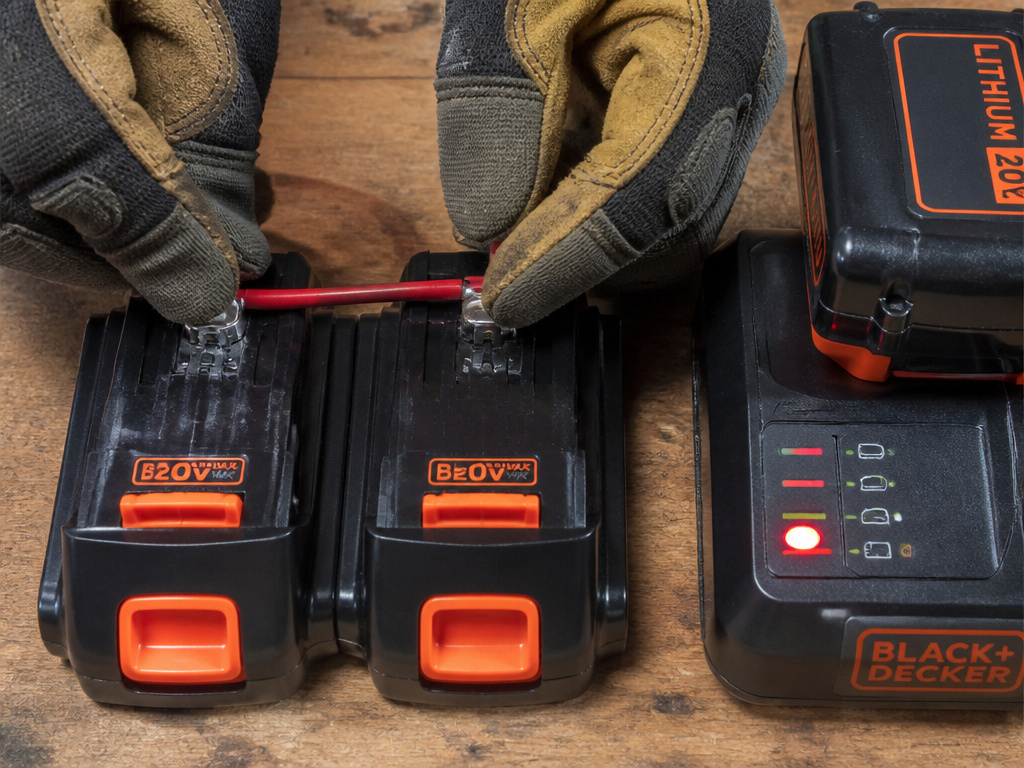
When a lithium-ion battery sits discharged for months, its voltage can drop below the charger’s minimum safety threshold. The charger sees this as a fault and flashes rapid red. The battery isn’t necessarily dead; it’s in sleep mode.
Warning: This procedure involves connecting two batteries directly. Incorrect connections (positive to negative) can cause sparks, heat, or damage. If you are unsure, skip this and contact service.
- You need a known-good Black & Decker battery of the same voltage (e.g., another 20V MAX pack).
- Use a short piece of insulated wire, like a piece of 18-gauge speaker wire.
- Identify the terminals. On Black & Decker batteries, the flat metal plates are the terminals.
- Touch one end of the wire to the positive terminal of the good battery.
- Touch the other end to the positive terminal of the “dead” battery. Hold it there.
- Take a second wire and connect the negative terminals of both batteries together.
- Hold the connections for 15-30 seconds only. You are not charging; you are giving the dead battery enough voltage to wake up.
- Disconnect. Immediately place the jumped battery on its charger. It should now show a blinking green light.
This works because you’re using the good battery as a temporary voltage booster, tricking the dead battery’s protection circuit into waking up. If it still flashes rapid red after this, the battery is likely damaged and needs replacement. For more detailed troubleshooting, our guide on how to fix a drill battery that won’t charge walks through less common issues.
Common Charging Mistakes (And Their Consequences)
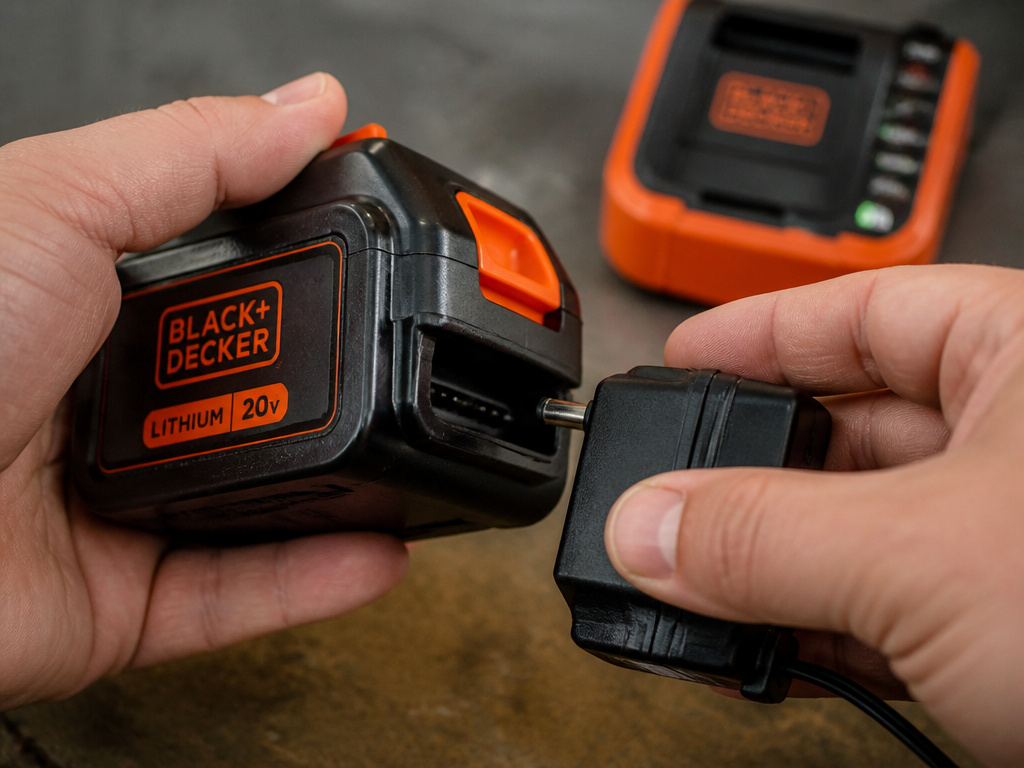
Using a non-original charger. Black & Decker chargers have handshake protocols with their batteries. A generic or other brand’s charger might fit physically but can deliver the wrong voltage or amperage. At best, it charges slowly. At worst, it overheats the battery, damaging the cells. This is a sure way to void your warranty. If you’ve lost your charger, buying an official Black & Decker replacement is the only safe option.
Charging in extreme environments. As outlined, temperature is critical. The consequence isn’t always immediate failure. It’s a slow, steady decline in run-time that you’ll blame on “old age” after just one season.
Not letting an overheated battery cool. After heavy use, the battery core can be much hotter than the outside case feels. Plugging it right in triggers the slow red flash. You wait ten minutes, try again, and it starts charging, but that heat cycle still stresses the cells. Let it rest until it’s room temperature.
Storing batteries fully discharged. A lithium-ion battery left at 0% for a long period will self-discharge further, pushing it into the sleep mode or damaging the chemistry. For long storage, charge the battery to about 50-60% and store it in a cool, dry place.
Black & Decker Drill Charging FAQ
Why is my Black and Decker charger blinking red?
A rapid red flash means the charger has detected a fault. The most common causes are a battery that is too hot, too cold, or has a voltage too low to safely begin charging. A slow alternating red flash specifically indicates an overheated battery.
Can I use a different Black and Decker charger?
You can use a different Black and Decker charger from the same voltage platform (e.g., a 20V MAX charger for a 20V MAX battery). Using a charger from a different brand or voltage system is dangerous and can damage the battery.
How long does a Black and Decker 20V battery take to charge?
Charge times vary by battery capacity. A compact 1.5Ah battery may charge in 1 hour, while a high-capacity 4.0Ah pack like the LB2X4020 takes about 2 hours. Most standard 2.0Ah batteries charge in 3-4 hours. Always refer to the manual for your specific model’s charging time.
Is it bad to leave the battery on the charger?
No. Modern Black & Decker chargers switch to a maintenance or “trickle” mode once the battery is full. A steady green light indicates this mode. It’s safe to leave the battery connected indefinitely, which is convenient for keeping your Black & Decker drill ready for the next project.
What should I do if my battery won’t charge after troubleshooting?
If you’ve checked the outlet, connections, temperature, and attempted a jump-start (if applicable), the battery or charger may be defective. Contact Black & Decker Customer Service at 800-544-6986 during Eastern business hours. Have your drill and battery model numbers ready. They will advise on warranty service or a local repair center.
The Bottom Line
Charging a Black and Decker drill battery correctly boils down to respecting three things: the right charger, the right temperature, and the battery’s own language of lights. Ignoring the 65°F–75°F window burns through battery life faster than any drilling ever could. Misreading a rapid red flash as a death sentence wastes a battery that might just need a 30-second jump.
For the vast majority of users, the process is simple: click, watch for green, and store the tool indoors. When it gets fussy, that’s the battery telling you something about its environment or history. Listen to it. Your drill’s runtime depends on it.
