
Decoding the Numbers on a Drill: Torque Settings Guide
This post contains affiliate links. As an Amazon Associate, we earn from qualifying purchases.
The numbers on a drill’s clutch ring set a torque limit, a ceiling on how much twisting force reaches the bit before the mechanism disengages with a click. Lower numbers (1-5) deliver light torque for small screws and soft materials; higher numbers (10-24) deliver heavy torque for long screws and hardwoods. The drill icon setting bypasses the clutch entirely for drilling holes.
That click isn’t a malfunction. It’s the clutch doing its job, stopping the chuck to prevent you from driving a screw too deep. Misunderstanding this turns a precision tool into a destructive one.
What follows is a breakdown of the clutch mechanism, a material-specific guide to the numbered settings, and the critical difference between the clutch, the gearbox, and the hammer function. By the end, you’ll set the dial by feel, not by guesswork.
Key Takeaways
- The numbered ring controls torque, not speed. Speed is managed by the trigger and gearbox.
- Start low and step up. Pick a clutch setting below what you think you need, test on scrap, and increase until the screw seats flush without stripping.
- Never drive screws in drill mode. The drill icon bypasses the clutch, applying full motor torque until something breaks.
- Listen for the click. That sound is the clutch disengaging at your set torque limit, signaling the screw is set.
- Match the number to the job. Small screws in drywall need a 3-5; deck screws in pressure-treated lumber need a 16-20.
What Do the Drill’s Clutch Numbers Actually Control?
The ring of numbers around your drill’s chuck has one job: to limit torque. Torque is rotational force, the drill’s “twisting power.” Each number corresponds to a higher torque ceiling.
The clutch is a mechanical slip mechanism. When resistance at the bit meets the force threshold you’ve dialed in, the internal plates disengage. The motor continues to run, but the chuck stops turning. This produces the characteristic rapid clicking sound.
This is a safety and precision feature. Without it, you would rely entirely on trigger feel to stop a screw, which is inconsistent and often too late. The clutch provides a hard stop.
The numbers are relative, not standardized. A “5” on a compact 12-volt drill delivers far less actual torque than a “5” on a heavy-duty 24-volt model. The principle, however, is universal: higher number, higher force limit.
The Mechanical “Why” Behind the Click
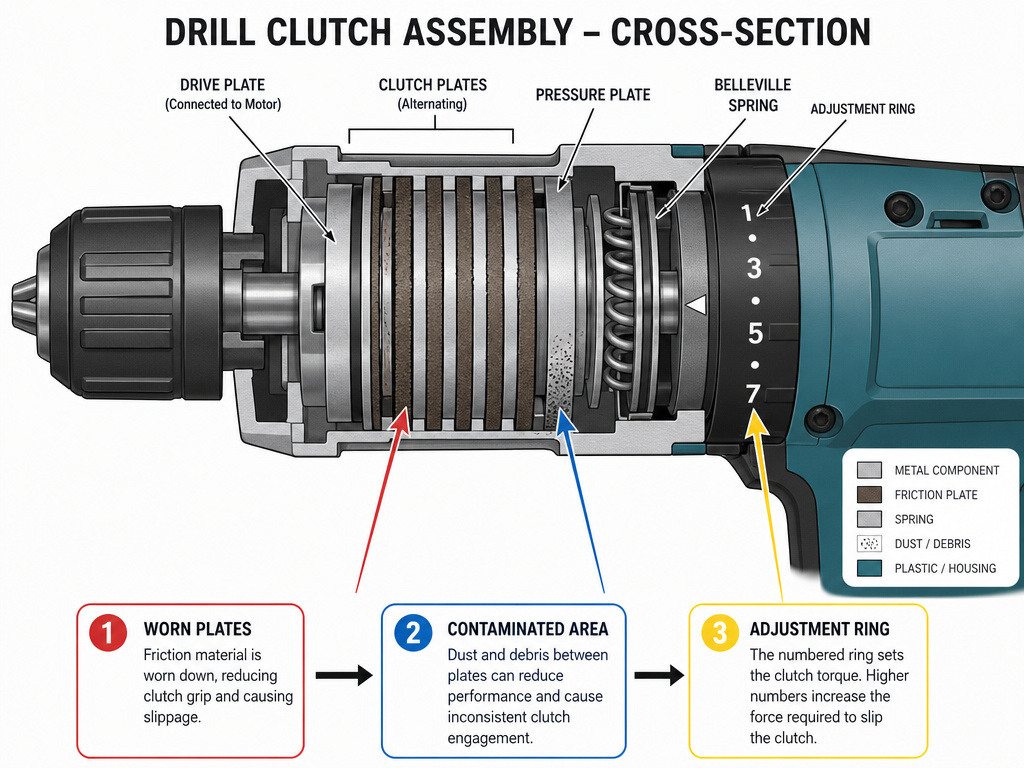
Inside the clutch assembly, a set of spring-loaded plates are compressed based on the ring’s position. A higher number compresses the springs more, requiring greater resistance to overcome them and slip. This is why you feel more “grunt” before the click on setting 15 versus setting 3. The mechanism is simple, durable, and the reason these tools last for years.
Where this goes sideways: Assuming the numbers control speed. If your screw isn’t going in and you crank the number higher, you’re not making it spin faster. You’re raising the force ceiling. The solution is almost always a pilot hole or a shift to the low-speed, high-torque gear.
The Torque Settings by the Numbers: A Practical Guide
Think of the clutch as a depth stop for rotational force. This table translates the abstract numbers into real-world applications.
| Clutch Setting Range | Best For | What Happens If You Go Too High |
|---|---|---|
| 1 – 4 | Small electronics, assembling furniture with particleboard, driving screws into drywall anchors. | The screw head strips instantly, the anchor spins uselessly, or the particleboard core blows out. |
| 5 – 9 | General DIY: hanging pictures, assembling shelving with pine or plywood, installing cabinet hardware. | The screw sinks below the surface (countersinks too deep), or the wood fibers split around the head. |
| 10 – 15 | Heavier work: building a deck frame with softwoods, driving 3-inch screws into studs, lag bolts into pine. | The lag bolt snaps its head off, the deck screw strips its drive recess, or the driver bit snaps. |
| 16 – 24 | Maximum torque: structural connections, long screws into hardwood, driving large lag bolts or threaded rod. | The material itself fails—a joist cracks, a metal bracket bends, or the drill’s internal clutch gears wear prematurely. |
The SKIL 20V Drill Driver‘s manual lists 17 clutch positions plus drill mode. The WORX WX100 series offers 20+1 positions. These aren’t arbitrary; they provide fine-grained control for professional results.
Common mistake: Using the same setting for every screw in a project. Material density changes. Screw length varies. Dial the clutch for each task. Those thirty seconds you save by not adjusting are less than the thirty minutes you’ll spend fixing a stripped screw or split board.
Start every new material or screw type on a lower setting. Run a test screw into a scrap piece. If the clutch clicks before the screw is fully seated, increase the setting by two or three numbers and try again. Repeat until the screw drives flush and the clutch clicks just as it seats. That’s your setting for that job.
Drill Mode, Gearbox, and Hammer: The Other Dials
The clutch ring works alongside other controls. Confusing them is the fastest way to break things.
Drill Mode (Drill Bit Icon): This setting physically bypasses the clutch mechanism. All motor torque goes directly to the chuck with no cutoff. It is exclusively for drilling holes. When a drill bit is spinning in wood or metal, you want continuous power, a clutch tripping mid-hole would be useless and damaging.
Never drive screws in drill mode. With no torque limit, the screw will continue driving until the head strips, the material explodes, or the bit jumps out and scars your workpiece. I learned this the hard way years ago, punching a cabinet screw straight through a door face before my finger could leave the trigger.
Two-Speed Gearbox: This is usually a sliding switch near the trigger, marked “1” and “2.” This changes the gear ratio inside the drill. * Gear 1 (Low Speed, High Torque): Delivers maximum twisting force at a slower rotational speed. Use this for driving large screws, drilling large holes, or using high-torque attachments like auger bits. * Gear 2 (High Speed, Low Torque): Spins the chuck faster with less available torque. Use this for drilling small holes, driving small screws quickly, or using high-speed bits like spade bits.
The gearbox controls how the power is delivered. The clutch controls how much power is allowed.
Hammer Mode (Hammer Icon): Found on hammer drills, this setting engages a mechanical pounding action alongside the rotation. It’s for drilling into masonry, concrete, brick, or stone. The hammer mechanism delivers thousands of impacts per minute to pulverize the material as the bit rotates.
| Control | Symbol | Function | Use For | Never Use For |
|---|---|---|---|---|
| Clutch | Numbers 1-24 | Sets torque limit | Driving screws, bolts, fasteners | Drilling holes |
| Drill Mode | Drill bit icon | Bypasses clutch, full torque | Drilling holes in wood, metal, plastic | Driving screws |
| Gearbox | 1 / 2 | Changes speed/torque ratio | Gear 1: big screws/holes; Gear 2: small screws/holes | N/A |
| Hammer Mode | Hammer icon | Adds impact action | Drilling into masonry, concrete | Drilling into wood or metal |
How to Use the Clutch Correctly: A Step-by-Step Method
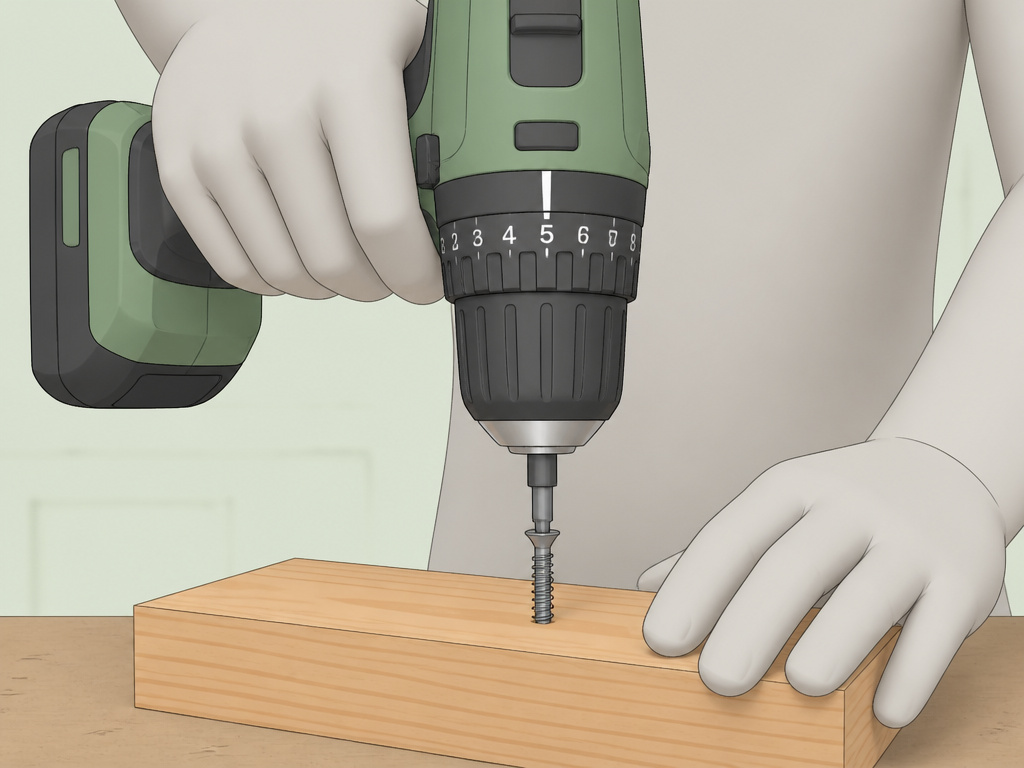
Follow this sequence to eliminate guesswork and guarantee clean results.
- Select the correct driver bit. A worn or ill-fitting bit will cam out and strip the screw head before the clutch ever engages. Ensure it’s seated fully in the chuck.
- Set the gearbox. For screws larger than a #8 or for drilling holes over 1/4″, start in Gear 1 (low speed, high torque).
- Set the clutch. Choose a setting in the lower third of the range for your task (see the table above). When in doubt, start at 5.
- Drill a pilot hole (if needed). For hardwoods, dense materials, or screws near the edge of a board, a pilot hole is non-negotiable. It prevents splitting and reduces driving resistance, letting the clutch work accurately.
- Drive a test screw into scrap. Use the same material and screw for your project. Drive the screw until the clutch disengages and clicks.
- Evaluate and adjust. If the screw is not seated flush, increase the clutch setting by 2-3 numbers and try another test screw. If the screw head strips or the material damages before the screw is seated, your setting is too high, decrease it.
- Proceed with the project. Once the test screw seats perfectly, use that clutch setting for all identical screws in your project.
Skipping the test screw is how you ruin the first piece in your project. That piece becomes your expensive, frustrating test scrap.
When the Clutch Doesn’t Click: Troubleshooting
Sometimes the system doesn’t behave. Here’s what to check.
The drill clicks immediately upon starting.
- Cause: The clutch is set far too low for the resistance.
- Fix: Increase the clutch setting significantly. If it still happens in Gear 2, switch to Gear 1 for more torque.
The drill doesn’t click, and the screw keeps driving.
- Cause: You are in drill mode (drill bit icon). The clutch is bypassed.
- Fix: Rotate the clutch ring off the drill icon and onto a numbered setting.
The drill strains but doesn’t click or drive the screw.
- Cause: The task exceeds the drill’s power, or the bit is slipping. You may be in too high a gear.
- Fix: Switch to Gear 1. Ensure the bit is sharp and properly seated. For very heavy tasks, you may need a more powerful tool like an impact driver.
The clutch settings feel inconsistent.
- Cause: Worn clutch plates, contamination with dust or grease, or a faulty spring. This is common in very old or heavily abused drills.
- Fix: The clutch assembly can often be serviced or replaced. For most modern cordless drills, it’s more cost-effective to upgrade.
The Professional’s Edge: Settings for Common Materials
Beyond the basic ranges, here are the nuanced settings for specific jobs.
- Drywall: Use a 3-5. The goal is to sink the screw just below the paper surface without breaking it. A clutch is essential here.
- Decking (Pressure-Treated Lumber): Start at 14-16. This wood is often wet, dense, and abrasive. It requires significant torque but will split if you overdo it. Pre-drilling is recommended.
- Cabinet Hanging (Plywood into Studs): A 10-12 is usually sufficient. You need enough power to pull the cabinet tight, but not so much that you distort the cabinet frame.
- Furniture Assembly (MDF/Particleboard): Use a 4-6. These materials have almost no shear strength. High torque will cause the internal particles to crumble, destroying the screw’s hold.
The Kobalt 24V Brushless Drill/Driver manual specifies an operating temperature range of 41°F to 104°F. In a cold garage, battery output and clutch spring tension can be affected, making a setting that worked in summer feel weaker. Allow the tool to acclimate to room temperature for consistent results.
Frequently Asked Questions
Why does my drill have two sets of numbers?
If you see numbers like “0-400/0-1600/min” on the tool’s nameplate, those are no-load speed ratings in revolutions per minute (RPM), not clutch settings. They indicate the speed range of the chuck when the trigger is fully pressed with no load, typically corresponding to Gear 1 and Gear 2.
What does the “20V Max” or “24V” rating mean?
This is the tool’s nominal voltage, representing the battery platform’s power. It’s different from the clutch numbers. A higher voltage platform (like 24V vs. 18V) generally delivers higher maximum torque, meaning its “15” setting will be stronger than a lower-voltage drill’s “15.”
Can I damage my drill by using the clutch?
Using the clutch correctly prevents damage. The clutch is designed to slip to protect the drill’s motor and gears from excessive strain. The real damage comes from forcing a drill in drill mode or too high a gear, which overheats the motor and strips internal gears.
Do impact drivers have a clutch?
Most impact drivers do not have a traditional, adjustable clutch. They use a different mechanism (rotating hammer and anvil) that delivers bursts of concussive torque. Depth control is achieved through variable trigger pressure, practice, or an optional accessory depth collar.
What’s better for driving screws: a drill or an impact driver?
For precision work like cabinetry or furniture where surface appearance is critical, a drill with its adjustable clutch is the superior tool. For high-volume, high-torque work like deck building or framing, an impact driver is faster and less likely to stall or strain. Many pros use both, the drill for pilot holes and the impact driver for driving.
The Bottom Line
The numbers on your drill are there to help, not confuse. They translate muscle memory into a mechanical setting, giving you repeatable, professional results. Stop treating them as a mystery dial.
Grab a piece of scrap wood and a handful of screws. Set your clutch to 5 and drive one in. Feel the click. Crank it to 15 and feel the difference. That hands-on practice is worth more than any manual. Once you internalize that click as the sound of a job done right, you’ll never strip another screw by accident.
