
What Is a Drill Used For | The Core Tasks Beyond Holes
This post contains affiliate links. As an Amazon Associate, we earn from qualifying purchases.
A drill is a power tool designed to bore holes in materials like wood, metal, concrete, and plastic. Its rotary motion, powered by electricity, batteries, or compressed air, spins a cutting accessory called a drill bit. The tool’s true versatility, however, comes from its ability to drive screws, mix materials, and perform precision tasks through adjustable speed and torque settings.
That hole-making function is the foundation. Every other capability builds from the motor’s ability to spin a shaft, the chuck, with controlled force. The chuck holds the bit, and the trigger controls the speed. A forward/reverse switch changes the rotation direction.
What follows is a breakdown of the four core jobs a drill performs, the physical reasons why specific drills excel at certain tasks, and a direct comparison of the three main drill types you’ll find at any hardware store. By the end, you’ll know exactly which tool to grab for your next project.
Key Takeaways
- A drill’s primary job is boring holes, but its secondary function, driving screws, is equally critical for assembly and construction.
- The chuck is the clamping mechanism that holds bits; a 1/2-inch keyless chuck is the standard for general-purpose work.
- Torque (rotational force) and RPM (rotational speed) have an inverse relationship; low gear provides high torque for driving, high gear provides high speed for drilling.
- An impact driver delivers rotational impacts for high-torque screw driving but cannot drill holes, while a hammer drill adds a pounding action for masonry.
- Always match the drill bit type and speed to your material; a Bosch HSS drill bit for metal requires a slower speed and cutting oil to prevent overheating.
The 4 Primary Functions of a Drill
A drill is not a single-task gadget. It’s a platform. Understanding its full range turns it from a hole-puncher into the most reached-for tool in your shop.
1. Boring Holes (The Primary Task)
This is the drill’s reason for being. The rotary action of a drill bit cuts a cylindrical hole by shearing away material. The bit’s flutes channel the debris, called swarf, out of the hole.
The relationship between the power tool and the drill bit is mutually dependent. Optimizing the service life of both requires matching the bit’s geometry and the drill’s speed to the material being cut.
Success hinges on three things: bit selection, speed, and pressure. A wood spur bit pulls itself into the grain. A masonry bit uses a carbide tip to grind. A Forstner bit cuts flat-bottomed holes for hinges. The Bosch accessory guide recommends specific bit types for material and size: a wood drill bit up to 32mm, a steel drill bit up to 20mm, and a concrete drill bit for masonry.
Use the drill’s high-speed setting (gear 2 on most models) for boring holes. Higher RPMs produce a cleaner, faster cut in wood and metal. For metal, especially steel over 350 HRB, the guide recommends cutting speeds as low as 400 RPM for a 20mm bit to manage heat. If possible, use a coolant. Without it, the bit overheats, loses its temper, and dulls in seconds.
2. Driving and Removing Screws
This is where a drill becomes a driver. By swapping the drill bit for a driver bit (Phillips, square, Torx), you convert the rotary force into fastening power. The clutch is the critical component here.
The clutch is a numbered collar on the drill, often ranging from 1 to 15+. It controls the torque, the rotational force, applied before the clutch disengages and the drill head spins freely with a clicking sound. Set the clutch to a low number for delicate tasks like assembling a cabinet hinge. The drill will stop driving before the screw strips the wood or snaps its head off. Crank it to the max setting or the drill-bit icon to deliver full torque for sinking a lag bolt into a stud.
Use the drill’s low-speed, high-torque setting (gear 1) for driving screws. The slower speed gives you more control and prevents the bit from cambering out of the screw head, which is the main cause of stripped screws. It also provides the raw twisting power needed to pull two pieces of timber together.
3. Mixing and Agitating
The drill’s ability to deliver sustained rotational force makes it an excellent mixer. This is a secondary application, but it’s a massive time-saver. You need a dedicated mixing paddle, not a drill bit. These paddles have large, flat blades designed to move volume.
Use this for mixing joint compound, paint, thinset mortar, or even concrete in a bucket. The key is to use a variable speed trigger. Start slow to avoid splashing, then increase speed to fully incorporate the material. An old, retired drill often finds a permanent second life as a mixing tool. The constant, high-torque demand can wear out a drill not built for it, so don’t use your best brushless model for mixing bags of mortar every weekend.
4. Precision Tasks: Drilling Pilot Holes and Countersinking
This is advanced drill work that separates a clean project from a cracked one. A pilot hole is a small-diameter hole drilled before driving a screw, especially near the end of a board or into hardwoods. It prevents the wood from splitting by relieving internal pressure.
A countersink is a conical recess that allows a screw head to sit flush with or below the surface. You can do this with a separate countersink bit after drilling, or use a combination drill bit that bores the pilot hole, clearance shaft, and countersink cone in one shot. This function is all about control and foresight. It requires a steady hand and an understanding of how wood grain behaves under stress.
Drill vs. Impact Driver vs. Hammer Drill: The Real Difference
The hardware store aisle presents three similar-looking tools. Grabbing the wrong one leads to frustration, broken bits, or a failed task. Here’s the breakdown.
| Tool | Primary Mechanism | Best For | Cannot Do |
|---|---|---|---|
| Drill/Driver | Continuous rotary force | Drilling holes, driving screws with precision, mixing | High-torque screw driving into dense material without stalling |
| Impact Driver | Rotary force + rotational impacts (hammer/anvil) | Driving long/deck screws, lag bolts, removing stubborn fasteners | Drill standard round-shank drill bits (requires hex-shank bits) |
| Hammer Drill | Rotary force + forward hammering pulses | Drilling into masonry, brick, light concrete | Heavy-duty demolition; a dedicated rotary hammer is better for frequent masonry work |
Where this goes sideways: Using an impact driver to drill a hole with a standard drill bit. The impact mechanism will shatter the bit’s shank where it seats in the chuck. Impact drivers require 1/4-inch hex-shank drill bits, which are less common and often more expensive.
A drill/driver is your generalist. Its three-jaw chuck accepts a vast range of round-shank bits. The clutch gives you precision control. The impact driver is your specialist for brute-force fastening. Its internal hammer and anvil slam together hundreds of times per minute, delivering bursts of rotational impact that prevent wrist-kickback. It’s shorter, lighter, and perfect for driving dozens of deck screws. The hammer drill is a drill/driver with an extra mode. A switch engages two metal discs with cammed teeth that push the chuck forward in rapid pulses while it spins. This “hammer” action helps grind through masonry. For a few anchor holes a year, it’s fine. For a patio project, you need a rotary hammer.
The Anatomy of a Drill: What Each Part Actually Does
Knowing the names isn’t pedantry. It’s how you troubleshoot and use the tool correctly.
- Chuck: The clamp at the front that holds the bit. A keyless chuck is tightened by hand; a keyed chuck requires a special gear key for maximum grip. Most modern drills have a 1/2-inch keyless chuck.
- Trigger: Variable-speed switch. Squeeze lightly for slow rotation, fully for top speed. This is your primary control.
- Forward/Reverse Switch: Usually located above the trigger. Changes the rotational direction for driving (forward) or removing (reverse) screws. The center position is a trigger lock.
- Gear Selector: Typically a 1 and 2 setting. Gear 1 is low speed, high torque for driving. Gear 2 is high speed, lower torque for drilling.
- Torque Adjustment Collar (Clutch): The numbered ring behind the chuck. Sets the maximum torque before the clutch disengages. Turn it to the drill bit icon to bypass the clutch for full-time drilling.
- Battery/ Power Cord: The energy source. Cordless offers portability; corded offers consistent, unlimited power.
Common mistake: Leaving the clutch on a low setting when trying to drill a hole. The drill will click and stop as soon as it meets resistance. Always switch to the drill-bit icon or the highest setting before drilling.
Choosing the Right Drill Bit is Half the Job
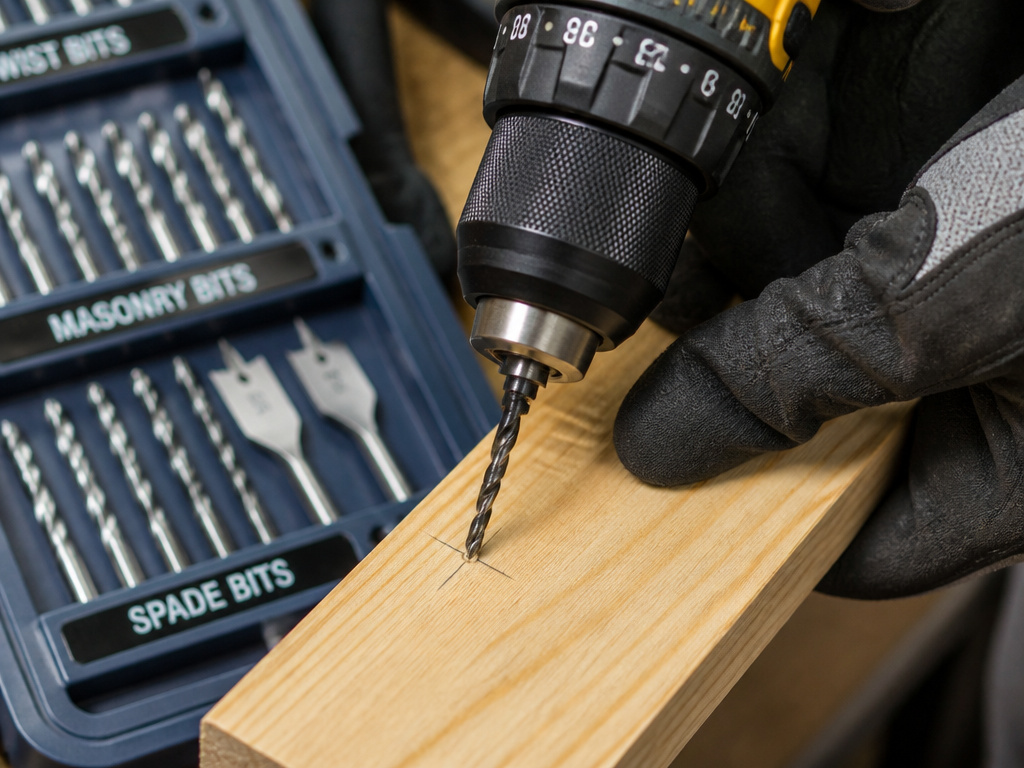 The drill provides the power. The bit does the cutting. A mismatch guarantees a bad result.
This table matches common materials to the correct bit type and a critical operating tip.
| Material | Bit Type | Key Spec | Operating Tip |
|---|---|---|---|
| Softwood / Plywood | Brad Point or Twist Bit | Sharp spur for clean entry | High speed, firm pressure. Let the bit’s flutes clear chips. |
| Hardwood / Metal | HSS (High-Speed Steel) Twist Bit | 118° point angle for general use | Slow to medium speed. Use cutting oil on metal to lubricate and cool. |
| Masonry / Concrete | Carbide-Tipped Masonry Bit | Percussive hammer drill required | Use hammer mode, steady pressure. Pull out frequently to clear dust. |
| Tile / Glass | Diamond Grit or Spear Point Bit | No hammer action | Very slow speed, light pressure. Use a continuous water drip to cool. |
| Large Holes in Wood | Spade Bit, Hole Saw, Forstner Bit | Pilot point for centering | Start slow to establish cut, then increase speed. Forstner bits need high RPM. |
The Bosch guide is blunt: using a drill bit on a material it’s not designed for shortens the bit’s life by a factor of six. A wood bit will burn up on metal. A masonry bit will tear out wood fibers. Keep your bits sorted and labeled.
Essential Safety and Maintenance: Non-Negotiables
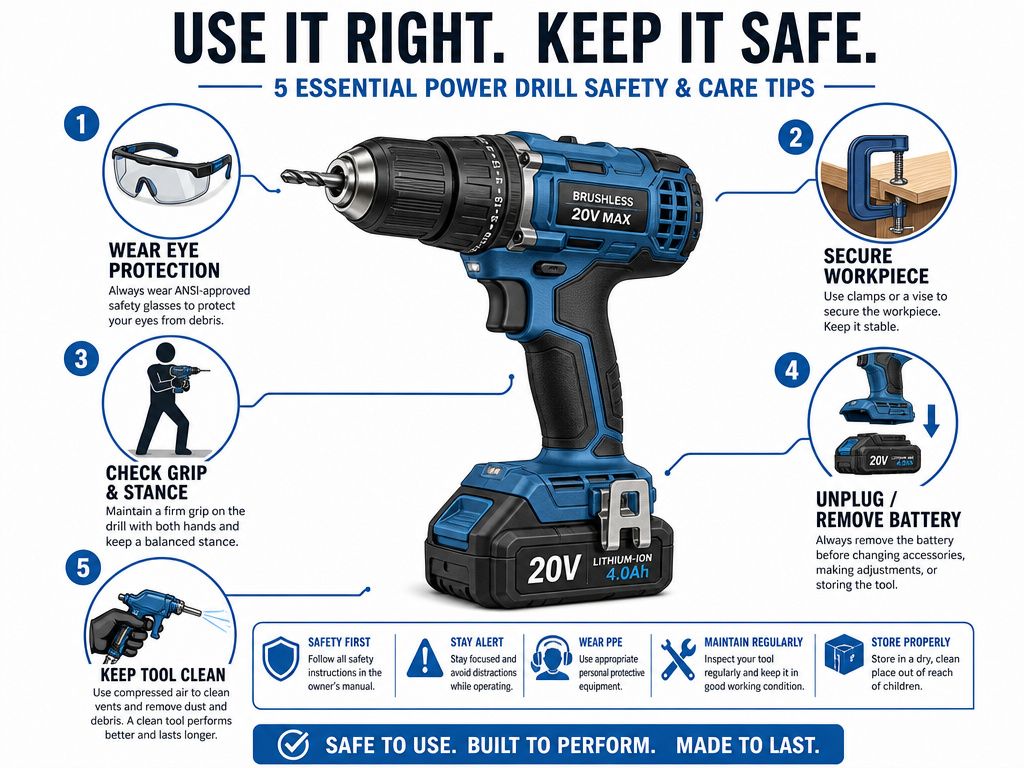 A drill is a safe tool until it isn’t. Respect the spinning chuck and the sharp bit.
- Wear eye protection. Always. Swarf from metal or a shattered masonry bit travels fast enough to cause permanent eye damage.
- Secure your workpiece. Use clamps or a vise. A spinning piece of wood or metal is a dangerous projectile.
- Check your grip and stance. Keep your body balanced, not leaning over the drill line. If the bit binds, the tool can twist violently.
- Unplug or remove the battery before changing bits or performing any maintenance.
- Keep the tool clean. Blow out dust from the vents after use. For corded tools, regularly check the cord for damage.
Maintenance is simple. For cordless tools, keep batteries at room temperature and cycle them occasionally. For corded drills, the motor brushes will eventually wear out, you’ll see less power and possibly sparks from the vents. Most modern consumer drills are not designed for brush replacement; it’s a sign to upgrade. For heavy-duty brands, brush kits are a standard service item.
Frequently Asked Questions
What’s the difference between a drill and an impact driver?
Drill provides smooth, continuous rotational force and has a chuck that accepts many bit types. An impact driver delivers bursts of rotational impact (hammering action) for extreme torque and uses only 1/4-inch hex shank bits. Use a drill for precision and drilling. Use an impact driver for high-torque fastening.
Can I use my drill as a screwdriver?
Yes, absolutely. This is a core function. Install a driver bit, set the clutch to a low number for delicate work or a high number for power, and use the low-speed setting. The clutch prevents over-driving and stripping the screw head.
What do the numbers on the drill’s clutch mean?
The numbers represent relative torque settings. A lower number (1-5) applies less rotational force before the clutch disengages and the drill clicks. A higher number (10-15+) applies more force. They are not standardized across brands, so you must test on scrap material. The drill-bit icon bypasses the clutch for full power, used only for drilling holes.
How do I choose between a corded and cordless drill?
Cordless drills offer complete portability and are sufficient for 95% of home projects. Modern lithium-ion batteries provide ample power and runtime. Choose a corded drill if you need unlimited run time for extended mixing, drilling many large holes, or if the tool will live on a workbench. Corded models are often more powerful for the money.
What is the “hammer” setting on my drill for?
The hammer setting engages a mechanism that pulses the drill bit forward while it spins. This hammering action helps grind through brittle materials like brick, concrete block, and stone. It is not for wood or metal. For frequent masonry work, a dedicated rotary hammer is far more effective.
What safety gear do I need when using a drill?
Safety glasses are mandatory. Hearing protection is recommended for extended use, especially with hammer drills. A dust mask is wise when drilling masonry or pressure-treated wood. Avoid loose clothing and gloves that could get caught in the chuck.
Before You Go
A drill is the cornerstone of a functional toolkit. Its job starts with making holes but extends into fastening, mixing, and precision preparation. The choice between a standard drill/driver, an impact driver, and a hammer drill comes down to the materials you face most often. For general home use, a mid-range cordless drill/driver from a major brand is the default pick. It will handle shelves, furniture assembly, and hanging pictures for a decade.
Remember that the bit is as important as the tool itself. Match it to your material, mind the speed, and let the tool do the work. Keep it clean, charge the batteries, and always clamp down your workpiece. That’s the foundation. Everything else is just practice.
